Independent comparisons. We may earn from shop links. More info

Smart extension lead comparison 2026

The best smart extension leads, compared.

Top pick: Tapo P304M Matter 4-socket strip – Highest score in the set: about £29.99, 4.8 from 773 reviews, four individually switched sockets and energy readings in the Tapo app. No USB, and Matter hubs do not get the energy data. Best value: HBN 1.8 m Wi-Fi strip, 600 J – About £28.99, the lowest shelf price among the other rows that score at least 70. 1.8 m, BS 1363 and 600 J stated. 3.7 from 24 reviews. Updated October 2026.

Peter F.
Peter F.Editor

A smart extension lead is a mains extension whose AC sockets switch from an app, a voice assistant or a schedule. It is not a USB charging cube and not a plain four-way with a neon lamp. You buy one in the UK when a socket sits behind a desk or a television and you want named outlets you can turn off without pulling every plug. Tell a suitable lead from a weak one by the plug, the shared current and the control path. A domestic lead needs a BS 1363 plug and a BS 1362 fuse. A Type B or Type C cell beside a UK-socket line means check the pins. The strip is still one 13 A circuit at 230 V. Extra sockets do not add amps. Do not add a heater, and do not daisy-chain. Wi-Fi is often 2.4 GHz only. A native home-app strip, a Matter strip and a cloud-app strip are different paths. Which path fits is set out in the [HomeKit or Matter guide](/hub/sockets-and-extension-leads/smart-extension-lead/sub/smart-extension-lead-homekit-vs-matter). Use it indoors unless the listing prints an IP rating.

A smart extension lead is a mains extension whose AC sockets switch from an app, a voice assistant or a schedule. It is not a USB charging cube and not a plain four-way with a neon lamp.

Tapo P304M Matter 4-socket strip

Best overall

Tapo P304M Matter 4-socket strip
9.6/10∼ £30

28 products checked · 61 hrs invested · +21,400 readers

8 of 8: Best smart extension leads compared

Swipe for more

1-2 of 8
Best overall
Tapo P304M Matter 4-socket strip
Meross MSS426 6-socket strip, no HomeKit
Meross MSS425F HomeKit 4-socket strip
Meross MSS426 HomeKit 6-socket strip
UseeLink Matter 4-socket strip
Meross MSP843 65 W GaN strip
Best value
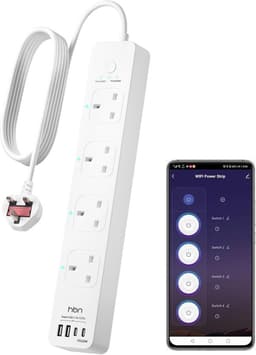
HBN 1.8 m Wi-Fi strip, 600 J
UseeLink 4-socket Smart Life strip
9.6/10
8.6/10
8.4/10
8.4/10
8.4/10
8.0/10
7.4/10
7.2/10
∼ £30
∼ £40
∼ £35
∼ £38
∼ £36
∼ £50
∼ £29
∼ £34
4.8(773)
4.3(1,001)
4.2(1,213)
4.2(884)
4.2(3)
4.0(90)
3.7(24)
3.6(15)
View offer
View offer
View offer
View offer
View offer
View offer
View offer
View offer

The best smart extension leads in detail

Tapo P304M Matter 4-socket strip

Rank 1

Tapo P304M Matter 4-socket strip

∼£30

Our view

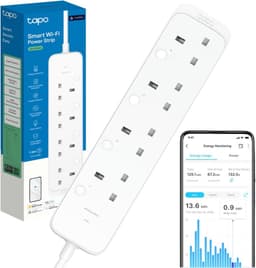
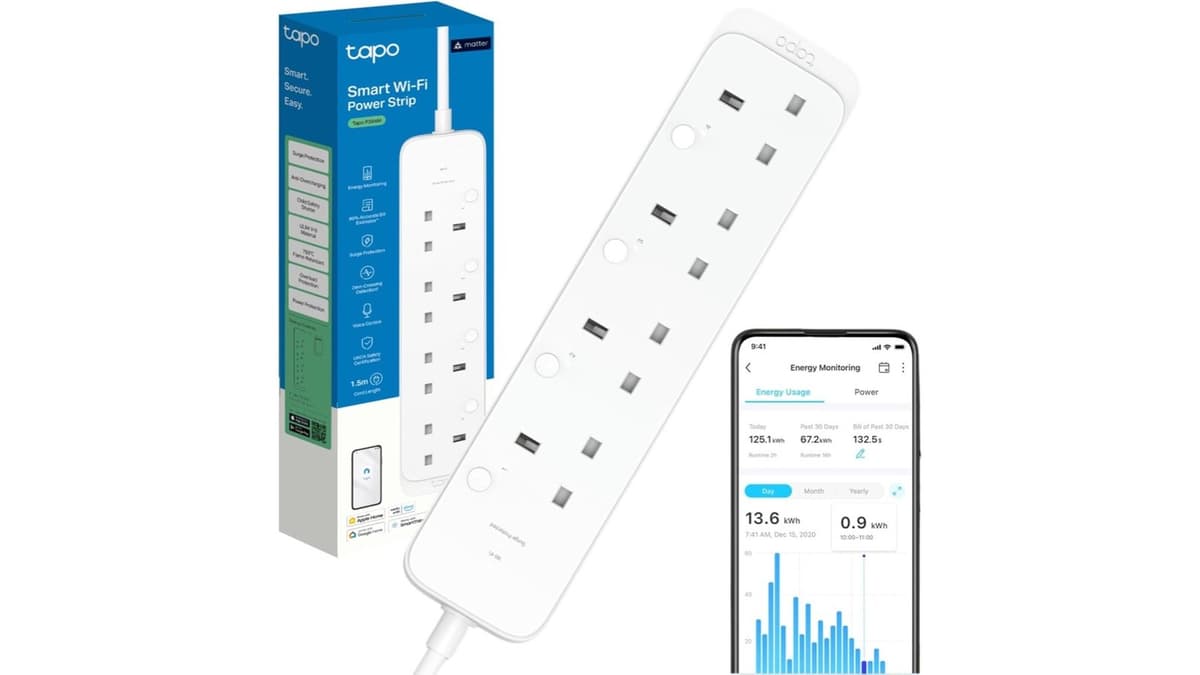
Across 773 amazon.co.uk reviews at 4.8, the Tapo P304M switches four UK sockets one by one from the Tapo app, Matter, Alexa or Google, and shows energy use per socket in the Tapo app at about £29.99. Several reviewers who also own Meross strips call this one sturdier under a desk, and many finish the first join in about a minute on 2.4 GHz. Local buttons on each socket matter when the Wi-Fi drops. The listing says energy monitoring through a Matter hub is not supported on this model, so Apple Home will not replace the Tapo watt screens. There are no USB ports on this listing. A Matter firmware path briefly switches loads off for some owners, and rectangular chargers can hide the socket LED. It is the top pick because it has the highest score in this set.

Pros

  • 4.8 from 773 reviews, the strongest star line in this set
  • Four individually switched AC sockets with local buttons
  • Energy readings per socket in the Tapo app
  • Matter platforms named: Apple Home, Alexa, Google, SmartThings

Cons

  • No USB ports on this listing
  • Energy data does not pass through a Matter hub on this model
  • Matter firmware updates can briefly cut power
  • Tapo app naming and rooms feel awkward to some reviewers

Best for: You want Matter plus a watts figure in the Tapo app on four sockets, and you do not need USB on the strip.

Less suitable: You need USB charging on the same bar, or you expected Apple Home to show the energy graphs.

Specifications

Model
Tapo P304M Matter 4-socket strip
Brand
Tapo
Price
∼£30
Customer rating
4.8/5(773)
Sockets
4 individual
Platform
Matter
Load
13 A
Wi-Fi
Not stated
USB
None
Energy
Tapo app
Hub
Matter + app
Local
Per socket

Common questions

Does the Tapo P304M show energy use?

The listing says you can estimate bills and see appliance consumption in the Tapo app. It also says energy monitoring through a Matter hub is not supported on this model.

Does it include USB ports?

The bullets do not list USB ports. A reviewer who owned an older Kasa strip noted that those USB ports are not on this model.

What load is stated?

The listing states a maximum of 13 A and 3,250 W, with surge protection and no joule figure. The protection rating printed is IP00.

Meross MSS426 6-socket strip, no HomeKit

Rank 2

Meross MSS426 6-socket strip, no HomeKit

∼£40

Our view

This Meross MSS426 listing is the non-HomeKit twin at about £39.99, with 4.3 from 1,001 reviews, slightly stronger stars than the HomeKit MSS426 ASIN. Bullets name Alexa, Google Home and SmartThings, and say Apple HomeKit, Smart Life and Tuya are not supported. Reviewers like named sockets for AV gear and schedules that cut standby when they leave for work. Some use Home Assistant over the Meross LAN integration. The Smart Energy Saving field prints No. After a power cut or unplug, several owners say the strip will not reconnect and Alexa links must be rebuilt. Sockets are tight for large adaptors, LEDs are bright, USB is a 20 W group only, and Plug Type prints Type B beside Type G. Indoor electronics, not several heaters at once.

Pros

  • Six individually switched sockets for Alexa or Google homes
  • 4.3 from 1,001 reviews, the largest Meross sample in this set
  • Clear bullet that HomeKit is not supported on this ASIN
  • 2-year warranty stated

Cons

  • No HomeKit on this listing
  • No energy monitoring; the field prints No
  • Reconnect failures after power cuts in reviews
  • Type G and Type B both printed

Best for: Alexa or Google households that need six sockets and will deliberately avoid the HomeKit MSS426 twin.

Less suitable: Apple Home buyers, or anyone who assumed every MSS426 was HomeKit.

Specifications

Model
Meross MSS426 6-socket strip, no HomeKit
Brand
Meross
Price
∼£40
Customer rating
4.3/5(1,001)
Sockets
6 individual
Platform
Alexa, Google
Plug
Type G and B
Load
13 A
Wi-Fi
2.4 GHz
USB
4 USB-A, 20 W
Energy
No
Hub
None
Local
One button

Common questions

Will this MSS426 work with Apple Home?

This listing says Apple HomeKit is not supported, and that Smart Life and Tuya are not supported. The HomeKit listing is a different ASIN.

Does it measure electricity?

The Smart Energy Saving field prints No. The bullets do not describe a watt meter.

What is the stated load?

The bullet says 13 A and 3,250 W total, with overload protection, for indoor electronics rather than several heaters at once.

Meross MSS425F HomeKit 4-socket strip

Rank 3

Meross MSS425F HomeKit 4-socket strip

∼£35

Our view

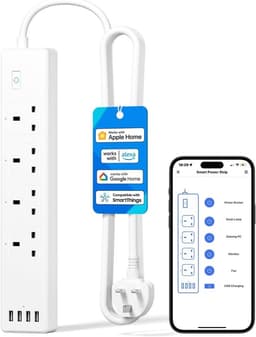
The Meross MSS425F is the HomeKit four-socket strip with a stated 1.8 m cord at about £34.99, scoring 4.2 from 1,213 amazon.co.uk reviews. Reviewers scan the HomeKit code, then often add Alexa or Google, and use schedules for lights and desks. Four AC sockets switch individually in the app. Four USB-A ports share up to 20 W as one group and are not USB-C. The housing button turns the whole strip together, which surprises people who expected a physical switch per socket. Pairing fails until 5 GHz is off on combined SSIDs, and some units drop Wi-Fi until a power cycle. LEDs are bright enough to disturb sleep, and there is no energy meter on this listing.

Pros

  • HomeKit-native with 4.2 from 1,213 reviews
  • 1.8 m cord stated on the listing
  • Four individually switched AC sockets in the app
  • Four USB-A ports up to 20 W as one group

Cons

  • No energy monitoring
  • USB-A only, switched as one group
  • Bright LEDs and fiddly wall slots in reviews
  • Type G and Type C both printed

Best for: Apple Home households that want four sockets, a stated 1.8 m lead, and USB-A on the same bar.

Less suitable: Anyone who needs a watts meter, USB-C laptop charging, or outdoor use.

Specifications

Model
Meross MSS425F HomeKit 4-socket strip
Brand
Meross
Price
∼£35
Customer rating
4.2/5(1,213)
Sockets
4 individual
Platform
HomeKit
Plug
Type G and C
Load
13 A
Wi-Fi
2.4 GHz
USB
4 USB-A, 20 W
Energy
No
Cable
1.8 m
Hub
None
Local
One button

Common questions

How long is the MSS425F cord?

The bullet states 1.8 m, also written as 6 ft.

Does it meter energy?

The listing does not claim energy monitoring. Reviewers who expected a meter say this strip does not have one.

Do the USB ports switch separately?

No. Four USB-A ports share up to 20 W and switch as one group. They are not described as USB-C.

Meross MSS426 HomeKit 6-socket strip

Rank 4

Meross MSS426 HomeKit 6-socket strip

∼£38

Our view

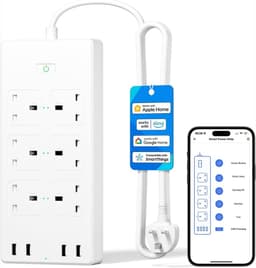
This Meross MSS426 listing is the HomeKit six-socket strip at about £38.24, with 4.2 from 884 reviews. It is not the same product as B09CH3WCDX, which shares the MSS426 model string and says HomeKit is not supported. Reviewers name each mains socket in Apple Home and run routines. Four USB-A ports share 20 W as one group, and the local button is all-or-nothing. First pairing often fails until 5 GHz or WPA3 is disabled. Recurring complaints include random power cycles that restart PCs, TVs and soundbars, plus bright bedroom LEDs and stiff sockets that block bulky plugs. Cord length is not stated on the kept amazon table, and the bullet is indoor use only.

Pros

  • Six individually switched UK sockets with HomeKit
  • 4.2 from 884 reviews on this HomeKit ASIN
  • Alexa, Google and SmartThings also named
  • 2-year warranty stated

Cons

  • Random power-cycle reports that restart PCs and AV gear
  • No individual physical switches; one button only
  • Bright LEDs and tight socket spacing
  • Cord length not stated on the kept amazon table

Best for: Apple Home users who need six named sockets on a TV unit or crowded desk and will keep a PC off the strip.

Less suitable: Households that refuse any risk of a strip power-cycling a PC, or shoppers who only checked the MSS426 model string.

Specifications

Model
Meross MSS426 HomeKit 6-socket strip
Brand
Meross
Price
∼£38
Customer rating
4.2/5(884)
Sockets
6 individual
Platform
HomeKit
Plug
Type G
Load
13 A
Wi-Fi
2.4 GHz
USB
4 USB-A, 20 W
Hub
None
Local
One button

Common questions

Is this the HomeKit version of the MSS426?

This listing, B08MJP8ZQF, names Apple HomeKit and Siri and says Smart Life is not supported. B09CH3WCDX uses the same model number and says HomeKit is not supported.

Can it be used outdoors?

The bullet says it is for indoor UK use and not for outdoor use.

Do the six sockets have their own buttons?

The listing gives individual control in the app or by voice. Reviewers say the button on the strip turns every socket and the USB group together.

UseeLink Matter 4-socket strip

Rank 5

UseeLink Matter 4-socket strip

∼£36

Our view

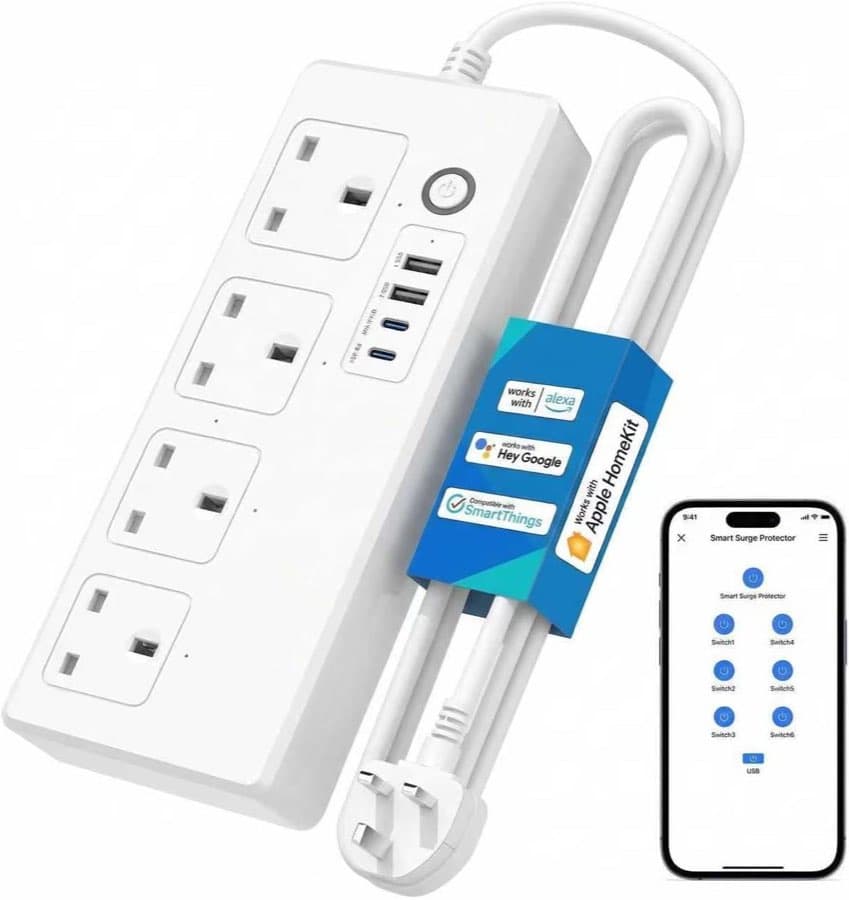
UseeLink’s Matter strip asks for a Matter-certified hub and 2.4 GHz Wi-Fi, with four individually switched AC sockets and a USB group at about £35.99. The star line is 4.2 from only three reviews, and the one UK review on the listing says SmartThings setup was easy and the strip stayed connected for a week. The listing itself conflicts: the table says 13 A while a bullet says 16 A / 3,500 W with a short-time caveat, and the USB story is two USB plus two USB-C in one place and four USB-A in a highlight. FCC and ETL appear in the bullet. BS 1363 is not printed beside the Type G plug cell. Treat this as a Matter option on paper, not as a proven twin of the Tapo P304M.

Pros

  • Matter with Apple Home, Alexa, Google and SmartThings named
  • Four individually switched AC sockets claimed
  • USB-C mentioned in the bullet, as a group
  • Matter hub requirement stated on the listing

Cons

  • Only 4.2 from 3 reviews
  • 13 A table conflicts with a 16 A / 3,500 W bullet
  • USB type description conflicts on the same page
  • FCC and ETL named; no BS 1363 line on the kept table

Best for: You already have a Matter hub and will accept a three-review listing while you verify the box.

Less suitable: Anyone who needs a large UK review sample or a clear single current rating.

Specifications

Model
UseeLink Matter 4-socket strip
Brand
UseeLink
Price
∼£36
Customer rating
4.2/5(3)
Sockets
4 individual
Platform
Matter
Plug
Type G
Load
13 A / 16 A
Wi-Fi
2.4 GHz
USB
2 USB, 2 USB-C
Hub
Matter hub

Common questions

Does this Matter strip need a hub?

The bullet says it requires a Matter certified hub and a 2.4 GHz router. It also names Apple Home, Alexa, Google Home and SmartThings.

Is the limit 13 A or 16 A?

The specification table says 13 A. A bullet says 16 A and 3,500 W and adds that it cannot be used that way for a long time. Both figures are on the listing.

Which USB ports does it have?

The bullet says two USB ports and two USB-C ports, switched as one unit. The item highlight says four USB-A ports. Those lines conflict.

Meross MSP843 65 W GaN strip

Rank 6

Meross MSP843 65 W GaN strip

∼£50

Our view

The Meross MSP843 is the HomeKit strip with a 65 W GaN USB bank, two USB-C and one USB-A switched as one group, plus four individually switched AC sockets at about £49.99. The star line is 4.0 from 90 reviews. Owners who get pairing done use it for laptop USB-C charging beside desk loads, and the listing says schedules can still run if the internet is down. Wi-Fi dropouts, daily lock-ups, and USB ports that die after weeks while AC still works are recurring themes. Meross support has sent replacements for some USB failures. Pairing can force a HomeKit path and block Alexa or the Meross app until 5 GHz is off. The Plug Type cell says Type B while the highlight says UK sockets. A green LED that keeps blinking annoys some bedrooms.

Pros

  • 65 W total for two USB-C and one USB-A with GaN III
  • HomeKit-native with four individually switched AC sockets
  • Schedules claimed to run if the internet is down
  • Useful when a laptop charger lives on the same bar

Cons

  • Highest price in this set at about £49.99
  • Only 4.0 from 90 reviews
  • USB ports failing while AC still works in reviews
  • Type B printed beside a UK-socket highlight

Best for: Apple Home desks that specifically want 65 W USB-C on the strip and accept a smaller review sample.

Less suitable: Buyers who only need AC switching, or who will not check the plug pins against the Type B cell.

Specifications

Model
Meross MSP843 65 W GaN strip
Brand
Meross
Price
∼£50
Customer rating
4.0/5(90)
Sockets
4 individual
Platform
HomeKit
Plug
Type B
Load
13 A
Wi-Fi
2.4 GHz
USB
65 W GaN
Hub
None
Local
One button

Common questions

How much USB power does the MSP843 claim?

The bullet says 65 W total for two USB-C PD ports and one USB-A port, using GaN III. The three USB ports switch as one group.

Does it need a hub?

The bullet says no hub is required and names Apple HomeKit, Alexa and Google Assistant on 2.4 GHz Wi-Fi only.

Will schedules run if the internet drops?

The schedule bullet says they can still run if the internet is down. That sentence is on this listing, not on every Meross strip in the set.

HBN 1.8 m Wi-Fi strip, 600 J

Rank 7

HBN 1.8 m Wi-Fi strip, 600 J

∼£29

Our view

The HBN BNPS-50/E81WT is the cheapest kept row at about £28.99, with a stated 1.8 m cord, BS 1363 named, 13 A / 3,120 W, and 600 J of surge protection, the only joule figure in this set. It joins Alexa, Google Home, and Smart Life or Tuya on 2.4 GHz only, with no hub claimed in the bullets. The star line is 3.7 from 24 reviews, so you cannot treat it as proven long-term reliability. Reviewers who get past setup like remote on/off and a housing button, but one returned the strip because the USB sockets were not on the smart control. A few owners describe units that stop responding after months or about two years, and bright indicator lights bother bedrooms. It is the best value because it is the lowest shelf price among the other rows that score at least 70.

Pros

  • Lowest shelf price in this set at about £28.99
  • 1.8 m cord and BS 1363 named on the listing
  • 600 J surge figure stated, the only joule figure in this set
  • Alexa, Google Home, and Smart Life or Tuya, with no hub claim

Cons

  • Only 3.7 from 24 reviews
  • USB sockets not on smart control for at least one reviewer
  • Reports of units dying after months or about two years
  • Bright indicator lights at night

Best for: You already live in Smart Life or Tuya, want a stated 1.8 m lead and a joule figure, and accept a thin review file.

Less suitable: You need HomeKit-native control, proven longevity, or USB ports that switch in the app.

Specifications

Model
HBN 1.8 m Wi-Fi strip, 600 J
Brand
HBN
Price
∼£29
Customer rating
3.7/5(24)
Sockets
4-way
Platform
Smart Life
Plug
BS 1363
Load
13 A
Wi-Fi
2.4 GHz
Energy
Claimed
Cable
1.8 m
Surge
600 J
Hub
None
Local
One button

Common questions

Will this HBN strip join 5 GHz Wi-Fi?

The listing says it only works with 2.4 GHz Wi-Fi and does not support a 5 GHz network.

How long is the cord?

The title and the bullet both state 1.8 metres.

Are the USB ports switched in the app?

The specification table does not list a USB count. One reviewer returned the strip because the USB sockets were not on the smart control.

UseeLink 4-socket Smart Life strip

Rank 8

UseeLink 4-socket Smart Life strip

∼£34

Our view

UseeLink’s SM-SO306-M1 lists four individually switched AC sockets and four USB-A ports as one 20 W group, with setup in Smart Life and bullets that also name HomeKit, Alexa, Google Home and SmartThings at about £34.19. The amazon.co.uk sample is only 3.6 from 15 reviews, so ecosystem claims stay unverified at scale. Reviewers who succeed describe a few minutes of setup and useful routines, but one unit lit an indicator while nothing plugged in would power or charge. Setup can be lost after a mains cut. The Plug Type cell prints Type B beside Type G, so the pins need checking in the box, and one measured strip disagreed with the printed dimensions.

Pros

  • Four individually switched AC sockets claimed
  • Four USB-A ports as a 20 W group on the listing
  • Smart Life setup with no hub in the bullet
  • About £34.19, mid of the set

Cons

  • Only 3.6 from 15 reviews
  • HomeKit claim is not a large proven HomeKit sample
  • Dead outputs reported while an indicator stayed lit
  • Type G and Type B both printed

Best for: You already use Smart Life and will treat the HomeKit line as a claim to check, not a guarantee.

Less suitable: You need a large UK review sample or a HomeKit-native Meross ASIN you can identify by listing.

Specifications

Model
UseeLink 4-socket Smart Life strip
Brand
UseeLink
Price
∼£34
Customer rating
3.6/5(15)
Sockets
4 individual
Platform
Smart Life
Plug
Type G and B
Load
13 A
Wi-Fi
2.4 GHz
USB
4 USB-A, 20 W
Hub
None

Common questions

Which app does this UseeLink strip use?

The bullet says setup is in the Smart Life app and that no hub is required. It also names Apple HomeKit, Alexa, SmartThings and Google Home.

Can each USB port be switched on its own?

No. The listing says the four USB-A ports are controlled as a group, with a 20 W maximum for those ports.

Is the plug Type G?

Power Plug Type prints Type G and the highlight says UK sockets. The Plug Type cell prints Type B, so the pins need checking in the box.

How we compared

Eight amazon.co.uk listings were scored for this page. The working score starts at 70. Evidence is four times the log of the review count, capped at 16, plus a star adjustment from 4.2. Spec points cover individual AC switching, a stated 13 A line, a clear UK plug story, HomeKit-native or Matter wording, and a stated cord length. Price adds up to 6 points at £30 or under. Penalties cover a review count under 20, listing conflicts, stars under 3.8 on a thin sample, a Type B or Type C cell, Wi-Fi dropouts, missing energy monitoring, and bright LEDs. The weights below sum to 100. No lab test was run. The top pick is the highest score. The best value is the lowest shelf price among the other rows that score at least 70.

1

Review evidence

38%

Review count adds round(4 × log10 of the count), capped at 16. Stars add round((stars − 4.2) × 12). A 4.8 from 773 gains more than a 4.2 from 3. A count under 20 is penalised.

2

Individual AC switching

19%

Eight points when each AC socket is individually switched in the listing. A four-way table line with no individual switching does not get those points.

3

Price band

14%

Six points at £30 or under, four from £30.01 to £36, two from £36.01 to £42, and none above £42. The best value is the lowest shelf price among the other rows at 70 or above.

4

Stated current

10%

Four points when 13 A and about 3,250 W or 3,120 W is printed. A table that says 13 A beside a bullet that says 16 A loses points for the conflict.

5

UK plug story

7%

Three points when a UK, BS 1363 or Type G story is clear. A Type B or Type C cell printed beside that story is penalised. FCC or ETL is not treated as a UK approval.

6

HomeKit or Matter

7%

Three points when HomeKit-native or Matter is named without a conflicting twin ASIN. The two MSS426 listings are scored apart because one says HomeKit is not supported.

7

Stated cord length

5%

Two points when a cord length is stated on the kept amazon.co.uk row. A length a reviewer measured is not counted as the specification.

Independent review
Last updated: October 2026
8 sources checked

Smart extension lead buying guide

The checks run in this order: the control path you already use, the UK plug, the shared 13 A load, then individual switching, USB grouping and any cord length the listing actually states. The table is the eight stored amazon.co.uk listings. Joule figures stay seller claims. None of these strips was tested in a lab for this page.

What is a smart extension lead?

A smart extension lead is a mains extension whose AC sockets switch from an app, a voice assistant or a schedule. It is not a USB charging cube and not a plain four-way with only a neon lamp. In this amazon.co.uk set the split is a HomeKit-native Wi-Fi strip, a cloud Wi-Fi strip aimed at Alexa and Google, and a Matter strip. One Matter listing meters energy in its own app and says a Matter hub does not receive those readings. Another says a Matter controller is required.

Best for

  • Named sockets behind a desk or a television, switched from an app or a schedule
  • An Apple Home household, or a renter who wants a watts figure in the maker’s app

Not ideal for

  • A kettle, a heater, or several high-power appliances on one strip
  • Outdoor use, or a buyer who treats a model string as proof of HomeKit

Mistakes to avoid

  1. 1

    Buying the MSS426 by model number

    Two listings use the MSS426 model string. One names HomeKit. The other says HomeKit is not supported. The ASIN is the listing you are buying. A matching model number does not make them the same product.

  2. 2

    Reading 3,250 W as per socket

    13 A at 250 V is 3,250 W for the strip, not for each socket. 13 A at 230 V is 2,990 W. HBN prints 13 A / 3,120 W. Extra sockets do not raise the plug limit. Do not daisy-chain, and do not add a heater.

  3. 3

    Pairing on 5 GHz or trusting a reviewer length

    These strips that state a band say 2.4 GHz only. A 5 GHz-only network will not pair. A cord length counts only when the listing states it. The MSS425F and the HBN lead say 1.8 m. A reviewer measurement is not the specification.

What to weigh up

Control path, plug and the 13 A load

High

Start with the app you already use. HomeKit-native rows in this set are the Meross MSS425F, the HomeKit MSS426 and the MSP843. The other MSS426 says HomeKit is not supported. HBN and the UseeLink Smart Life strip use Alexa, Google and Smart Life or Tuya. The Tapo P304M and the UseeLink Matter strip name Matter. The Tapo row meters energy in the Tapo app and says a Matter hub does not get that data. The UseeLink Matter bullet says a Matter hub is required. Then read the plug.

Switching, USB, cord length and where it can sit

High

Individual AC switching is stated for the Tapo, both Meross six-socket strips, the MSS425F, the MSP843 and both UseeLink rows. The HBN table says a four-way and a push button. It does not say each socket switches on its own. USB, where the listing describes it, is one group: four USB-A at 20 W on the Meross strips and the UseeLink Smart Life row, two USB-C plus one USB-A at 65 W on the MSP843, and a conflicting USB line on the UseeLink Matter row. The Tapo listing has no USB.

Which option suits you?

Three typical situations, each with a recommendation from this comparison.

Sockets you cannot reach

You want named outlets behind a desk or a television, with a button if the Wi-Fi drops. The Tapo P304M is the top pick at about £29.99, with 4.8 from 773 reviews, four switched sockets and energy readings in the Tapo app. There is no USB, and Apple Home does not show those watt screens.

An Apple Home household

You need HomeKit rather than Smart Life. The Meross MSS425F is about £34.99, with 4.2 from 1,213 reviews, a stated 1.8 m cord and four USB-A ports as one 20 W group. There is no energy meter. The plug table also says Type C.

A renter who wants a schedule

You want schedules without adding a wall socket, on Smart Life or Tuya. The HBN strip is the best value at about £28.99, with a stated 1.8 m cord, BS 1363 and 600 J. The star line is 3.7 from 24 reviews. Energy is claimed, but the listing does not say how it is measured.

Common questions about smart extension leads

Which smart extension lead is the top pick?
The top pick is the Tapo P304M at about £29.99. The amazon.co.uk line is 4.8 from 773 reviews, with four individually switched sockets and energy readings in the Tapo app. It has the highest score in this set. Energy data does not pass through a Matter hub on this model, there is no USB, and a Matter firmware update can briefly cut power. This page did not run a lab test.
Which smart extension lead is the best value?
The best value is the HBN 1.8 m strip at about £28.99. It is the lowest shelf price among the other rows that score at least 70. The listing states 1.8 m, BS 1363, 13 A / 3,120 W and 600 J, and it uses 2.4 GHz only. The star line is 3.7 from 24 reviews, so it is not a longevity claim. One reviewer said the USB sockets were not on the smart control.
What should you check before you buy a smart extension lead?
Check the control path, then the plug, then the 13 A limit. A HomeKit listing is not the same product as a twin that says HomeKit is not supported. A Type B or Type C cell beside a UK-socket line means the pins are unresolved. The strip is one 13 A circuit. Extra sockets do not add amps. Wi-Fi is often 2.4 GHz only. Use it indoors unless an IP rating is printed.
Is 3,250 W available at every socket?
No. These listings are 13 A for the whole strip. Meross prints 13 A / 3,250 W. HBN prints 13 A / 3,120 W. 13 A at 230 V is 2,990 W, and 13 A at 250 V is 3,250 W. That is arithmetic, not a per-socket rating. A kettle can use most of one plug. The UseeLink Matter row prints 13 A in the table and 16 A / 3,500 W in a bullet. Treat that conflict as unresolved.
Are the two MSS426 listings the same HomeKit strip?
No. B08MJP8ZQF names Apple HomeKit and says Smart Life is not supported. B09CH3WCDX uses the same MSS426 model string and says HomeKit is not supported. The non-HomeKit row is 4.3 from 1,001 reviews at about £39.99. The HomeKit row is 4.2 from 884 reviews at about £38.24. Buy the ASIN, not the model string. Both are indoor, both switch six sockets in the app, and both group four USB-A ports at 20 W.
Does a Matter strip show energy use in Apple Home?
Not on the Tapo P304M. The listing says you can see appliance consumption in the Tapo app, and that energy monitoring through a Matter hub is not supported on this model. Matter still needs a controller in the home for control away from home. The UseeLink Matter listing says a Matter-certified hub is required. Do not treat Matter as hub-free, and do not treat a star rating as a lifetime test.
Can each USB port on a smart extension lead be switched on its own?
No. Every USB model in this set switches the USB ports together. Meross groups four USB-A ports at 20 W, or two USB-C and one USB-A at 65 W on the MSP843. The UseeLink Smart Life strip groups four USB-A ports at 20 W. The HBN table does not list a USB count. The Tapo P304M lists no USB ports.
When should you call an electrician?
Call a registered electrician for extra wall sockets, scorch marks, a hot-plastic smell, a missing earth or a damp shed. Stop using a strip that sparks. These indoor listings are not outdoor products. The Tapo page prints IP00, and the HomeKit MSS426 bullet says not for outdoor use. A lead that charges by USB and does not switch from an app is the extension lead with USB comparison. A schedule does not raise the 13 A limit.

Our verdict

The top pick is the Tapo P304M at about £29.99, with 4.8 from 773 reviews, four individually switched sockets and energy readings in the Tapo app. It has the highest score in this set. Energy monitoring does not pass through a Matter hub on this model, and there is no USB. The best value is the HBN strip at about £28.99, the lowest shelf price among the other rows that score at least 70. It states 1.8 m, BS 1363, 13 A / 3,120 W and 600 J. The star line is 3.7 from 24 reviews. It is not the second-highest score. This page did not run a lab test.

Best overall
Tapo P304M Matter 4-socket strip

Tapo P304M Matter 4-socket strip

Highest score in the set: about £29.99, 4.8 from 773 reviews, four individually switched sockets and energy readings in the Tapo app. No USB, and Matter hubs do not get the energy data.

View offer
Best value
HBN 1.8 m Wi-Fi strip, 600 J

HBN 1.8 m Wi-Fi strip, 600 J

About £28.99, the lowest shelf price among the other rows that score at least 70. 1.8 m, BS 1363 and 600 J stated. 3.7 from 24 reviews.

View offer

Editorial

Peter F. - Editor
Editor
DIY & toolsSockets and extension leadsamazon.co.uk listings

Peter F. is the editor for DIY & tools at productscompared.co.uk. Comparisons in this category are checked against amazon.co.uk listings, review evidence and public UK sources.

Updated: October 2026
8 sources checked

Guides to smart extension leads

Guides on what to look for, how to use a product, and common mistakes.

Related comparisons

Sources

Sources taken from the research digest. Shelf prices, stars and review counts are the amazon.co.uk figures in the stored listings. This page did not run a lab test.

  1. Electrical Safety First — extension leads, cable reels and block adaptors (retrieved 22.10.2026)
  2. Electrical Safety First — plugs and fuses (retrieved 22.10.2026)
  3. SI 1994/1768 — Plugs and Sockets etc. (Safety) Regulations (retrieved 22.10.2026)
  4. Electrical Equipment (Safety) Regulations 2016, regulation 35 (retrieved 22.10.2026)
  5. GOV.UK — Electrical Equipment (Safety) Regulations 2016: Great Britain (retrieved 22.10.2026)
  6. IET — Safe use of electrical work equipment at home (retrieved 22.10.2026)
  7. Connectivity Standards Alliance — Matter FAQ (retrieved 22.10.2026)
  8. TP-Link UK — Matter (retrieved 22.10.2026)

This article contains affiliate links. If you buy through these links we may earn a small commission, at no extra cost to you. Prices, stars and review counts come from stored amazon.co.uk listings. We did not run a lab test.