Independent comparisons. We may earn from shop links. More info

How to set up a smart extension lead, step by step

Updated: 23 October 2026

The strip is out of the box and the phone will not see it. How to set up a smart extension lead in this UK set starts on the network the strip can actually join, then follows HomeKit Meross, Smart Life or Tuya, or Matter. This page does not pick a winner. The product table is the [smart extension lead comparison](/hub/sockets-and-extension-leads/smart-extension-lead). Peter F. used Meross and Tapo maker FAQs plus the amazon.co.uk listings on 21 October 2026. This is not a lab test. A qualifying purchase can earn a commission at no extra cost to you.

The strip is out of the box and the phone will not see it.

Our top picks

On this page

Get the phone onto 2.4 GHz before you open an app

Meross MSS425F, both MSS426 listings, and the MSP843 state 2.4 GHz only. HBN states 2.4 GHz only. UseeLink Matter asks for 2.4 GHz and a Matter-certified hub. The Tapo P304M kept amazon cell does not print a band. TP-Link’s UK page says 2.4 GHz only. A phone on a 5 GHz-only SSID will not see the strip. On a combined SSID, Meross reviewers often disable 5 GHz for the first join. Some guest modes block Matter and HomeKit devices. Put the strip close to the access point. Do not invent a reset timing from another brand. Use the leaflet if the first join fails. Ecosystem differences are on HomeKit or Matter.

HomeKit Meross, including the MSS426 that is not HomeKit

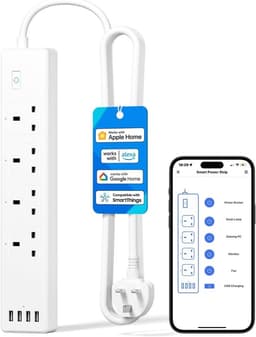
HomeKit-native ASINs in this set are Meross MSS425F (B08JG232D8), HomeKit MSS426 (B08MJP8ZQF), and MSP843 (B0CWL1168B). Each bullet says no separate hub is required to get started on 2.4 GHz. Scan the HomeKit code in the Apple Home app, or use the Meross app where the listing allows. Remote control in the Apple Home app away from home still needs an Apple home hub. Siri on the home Wi-Fi is the local case. Before a failed HomeKit scan, check you did not buy B09CH3WCDX. That listing is also model MSS426 and says Apple HomeKit is not supported. Setup there is the Meross app plus Alexa, Google, or SmartThings. The MSP843 schedule claim, if the internet is down, is not a pairing shortcut for every Meross strip.

Smart Life or Tuya, then Matter

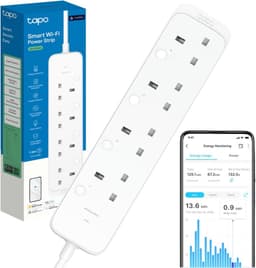
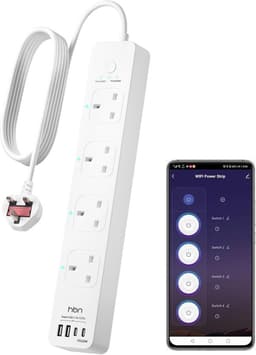
HBN (B0H93KGVNW) joins on 2.4 GHz through the HBN app, Smart Life, or Tuya, then Alexa or Google Home. No hub is claimed in the bullets. Do not copy a reset gesture from another brand. UseeLink Smart Life (B09CKZQXWB) says setup is in the Smart Life app, and the bullet also names HomeKit. Keep the first procedure on Smart Life on that fifteen-review listing. Tapo’s path for the P304M is Bluetooth in the Tapo app or a Matter code scan, on 2.4 GHz. If the Matter pairing window closes, power-cycle and retry rather than guessing a button hold. Energy screens stay in the Tapo app. UseeLink Matter states a Matter-certified hub, with only three reviews, so follow the leaflet.

Name the sockets, and know when to stop

Once the strip is online, name each AC socket for the lamp, monitor, or charger it feeds. USB banks in this set switch as one group. HBN’s table does not list USB. UseeLink Matter notes that app button order may not match the physical sockets, so rename them after a quick on/off test. Keep a PC off a scheduled socket. That room logic is on the home office page. Do not daisy-chain leads. Unplug if you see sparks, a hot-plastic smell, or scorch marks. Load limits stay on the buying guide.

Common questions

Why will my smart extension lead not join Wi-Fi?
Most of these strips are 2.4 GHz only. A phone on 5 GHz, a combined SSID that confuses setup, or a weak signal at first join are the usual blockers in reviews. Put the strip near the access point, and use the leaflet’s reset if the first join fails.
Do I need a hub for Meross HomeKit?
The amazon bullets say no hub to get started. Meross still documents an Apple home hub for remote Home-app control away from home. Local Siri on the home Wi-Fi is different. The no-hub line is not remote control with no Apple hub in the house.
I bought an MSS426 and HomeKit fails. What now?
Check the ASIN. B09CH3WCDX says HomeKit is not supported. Use the Meross app with Alexa or Google on that listing. HomeKit lives on B08MJP8ZQF. Smart Life and Tuya are not supported on B09CH3WCDX either.
How do I set up the Tapo P304M?
Use the Tapo app over Bluetooth or scan a Matter code, on 2.4 GHz. If the Matter window times out, power-cycle and retry per Tapo’s FAQ, rather than copying another brand’s button timing. Energy screens stay in the Tapo app.
Does the UseeLink Matter strip need a hub?
The bullet says a Matter-certified hub is required, plus 2.4 GHz. That listing has only three reviews, so stay with the leaflet and do not add unofficial hold-times.
After it joins, how should I name the sockets?
Name each AC socket for the load. Leave USB as one group where USB exists. Test the order on UseeLink Matter if the app map looks wrong, because the button order may not match the physical sockets.
When do I stop and treat it as an electrical fault?
Sparks, burning smell, hot casing, or scorch marks mean unplug. Daisy-chaining is not a fix. Call a registered electrician for a bad wall outlet or a missing earth. Those are not app settings.

Related pages

Sources

Sources taken from the research digest. Shelf prices, stars and review counts are the amazon.co.uk figures in the stored listings. This page did not run a lab test.

  1. Electrical Safety First — extension leads, cable reels and block adaptors (retrieved 22.10.2026)
  2. Electrical Safety First — plugs and fuses (retrieved 22.10.2026)
  3. SI 1994/1768 — Plugs and Sockets etc. (Safety) Regulations (retrieved 22.10.2026)
  4. Electrical Equipment (Safety) Regulations 2016, regulation 35 (retrieved 22.10.2026)
  5. GOV.UK — Electrical Equipment (Safety) Regulations 2016: Great Britain (retrieved 22.10.2026)
  6. IET — Safe use of electrical work equipment at home (retrieved 22.10.2026)
  7. Connectivity Standards Alliance — Matter FAQ (retrieved 22.10.2026)
  8. TP-Link UK — Matter (retrieved 22.10.2026)