Smart extension lead for home office: keep the PC off
The wall socket is behind the desk, the TV unit leaves no room for your hands, and you want schedules for lamps without crawling every evening. A smart extension lead for a home office is that unreachable strip: monitors, speakers, and chargers you can stand to lose for a minute, not a PC you would rather shut down cleanly. This page stays on one room. The table is the [smart extension lead comparison](/hub/sockets-and-extension-leads/smart-extension-lead). Peter F. used the kept amazon.co.uk listings on 21 October 2026. This is not a lab test. A qualifying purchase can earn a commission at no extra cost to you.
The wall socket is behind the desk, the TV unit leaves no room for your hands, and you want schedules for lamps without crawling every evening.
The wall socket is behind the desk, the TV unit leaves no room for your hands, and you want schedules for lamps without crawling every evening. A smart extension lead for a home office is that unreachable strip: monitors, speakers, and chargers you can stand to lose for a minute, not a PC you would rather shut down cleanly. This page stays on one room. The table is the smart extension lead comparison. Peter F. used the kept amazon.co.uk listings on 21 October 2026. This is not a lab test. A qualifying purchase can earn a commission at no extra cost to you.
Our top picks
| Badge | Product | Cable | Local control | USB | Note | Price | Offer |
|---|---|---|---|---|---|---|---|
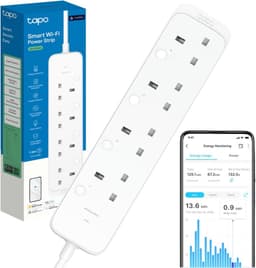
| Best overall |  Tapo Tapo P304M Matter 4-socket strip | Not stated | Per socket | None | 9.6 | about £29.99 | View offer |
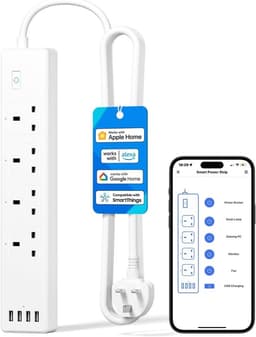
| Alternative |  Meross Meross MSS425F HomeKit 4-socket strip | 1.8 m | One button | 4 USB-A, 20 W | 8.4 | about £34.99 | View offer |
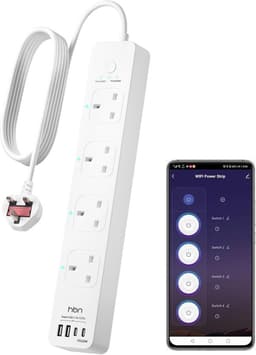
| Best value |  HBN HBN 1.8 m Wi-Fi strip, 600 J | 1.8 m | One button | Not listed | 7.4 | about £28.99 | View offer |
On this page
What you are trying to reach
What a schedule may turn off
Which kept listing fits this room
Common questions
Can I put my PC on a smart extension lead?
How long a cable do I need under a desk?
Which strip has USB-C for a laptop?
Should the router sit on a switched socket?
What if the lead smells hot under the desk?
Is the Tapo long enough for a TV unit?
Do I need Matter for a home office?
Related pages
Sources
Sources taken from the research digest. Shelf prices, stars and review counts are the amazon.co.uk figures in the stored listings. This page did not run a lab test.
- Electrical Safety First — extension leads, cable reels and block adaptors (retrieved 22.10.2026)
- Electrical Safety First — plugs and fuses (retrieved 22.10.2026)
- SI 1994/1768 — Plugs and Sockets etc. (Safety) Regulations (retrieved 22.10.2026)
- Electrical Equipment (Safety) Regulations 2016, regulation 35 (retrieved 22.10.2026)
- GOV.UK — Electrical Equipment (Safety) Regulations 2016: Great Britain (retrieved 22.10.2026)
- IET — Safe use of electrical work equipment at home (retrieved 22.10.2026)
- Connectivity Standards Alliance — Matter FAQ (retrieved 22.10.2026)
- TP-Link UK — Matter (retrieved 22.10.2026)