Independent comparisons. We may earn from shop links. More info

How to set up a Wi-Fi thermometer

Updated: October 2026

The app says it cannot see the sensor, and the phone in your hand is almost certainly on the fast network name. Setting up a Wi-Fi thermometer in a UK home means putting the right box onto a named 2.4 GHz network, proving that an alert actually fires, and only then leaving the sensor in the room. This page is the sequence. It does not rank the nine listings. Those rows are on the [Wi-Fi thermometer comparison](/hub/climate-measuring/wifi-thermometer). Products Compared editorial team used the amazon.co.uk listings in this set and the Govee H5179 manual. We did not sit on your router. A qualifying purchase can earn a commission at no extra cost to you.

The app says it cannot see the sensor, and the phone in your hand is almost certainly on the fast network name.

Our top picks

Govee Govee H5179

Best overall

Govee Govee H5179
8.6/10about £23.99
X-Sense X-Sense STH55

Alternative

X-Sense X-Sense STH55
7.3/10about £46.95
QXMH QXMH TH02 Pro

Best value

QXMH QXMH TH02 Pro
6.8/10about £15.99
On this page

Pair the box that actually joins the router

Do not hunt for a Wi-Fi menu on a sensor that has no radio of that kind. The direct clients here are the Govee H5179, the two-pack, the GoveeLife H5103, the ZenithCove WF001, the QXMH TH02 Pro, and the UbiBot GS1-AETH, which can also use Ethernet. The Wi-Fi client is the base for the X-Sense STH55 and the AEGISLINK ATHZ31. The AEGISLINK bullet says the sensor cannot be used alone. For the GoveeLife H5151, the gateway joins Wi-Fi. Bluetooth without that gateway is a local link, not a reading from the office. Fit the cells the listing includes, and put a base or gateway within a few metres of the router for the first join. Where a listing states a band, it is 2.4 GHz only. The H5151 and AEGISLINK tables do not state one.

Give the phone a 2.4 GHz name

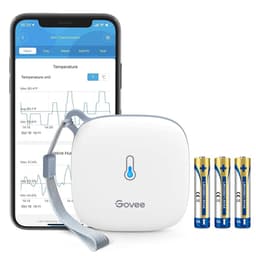
A combined name such as Home Wi-Fi lets the phone hop to 5 GHz while the sensor can only see 2.4 GHz. Turn off band steering and give the bands different names, then join the phone to the 2.4 GHz name before you open the sensor app. If an extender uses the same name, turn it off until the first pair succeeds. Open the app named for that brand: Govee Home, Smart Life, X-Sense Home Security, or the UbiBot app. The H5179 manual is specific to that model: Bluetooth on, 2.4 GHz and 802.11 b/g/n, tap +, select H5179. A blue flash about every 60 seconds means connected. Do not copy that path onto the other brands. If a UbiBot scan misses the SSID, use the Ethernet port on that logger.
Govee Govee H5179

Testsieger

Govee Govee H5179
8.6/10about £23.99

Prove the alert, then place the sensor

Set Celsius if the app offers it, then set a high threshold a little above the room and a low one a little below. Hold the sensor near a mug of hot water, not against a flame, until the phone notifies you, then cool it by a window until it crosses the low line. If nothing arrives, the graph is a picture, not a warning. On the H5179, CSV export is a mailbox step in the manual. Move the sensor only after that test. Keep it off the radiator, a sunny window, the kettle, and the fridge motor. A shelf at about chest height is enough in a house. The H5179 bullet says about 50 m of Wi-Fi on a clear path, and a brick wall cuts it. A holiday-let login page will not hold a sensor.

When setup should stop

Stop if an adapter smells, sparks, or trips the consumer unit, or if a unit is too hot to hold. One X-Sense review describes a USB supply that tripped the house. One QXMH review describes heat after a battery change. Those are single reviews, and they are still a reason to unplug that unit. Stop if you cannot split 2.4 GHz from 5 GHz. The NCSC says to factory-reset a smart device before you pass it on. For which architecture you should have bought, use the Wi-Fi thermometer buying guide and direct Wi-Fi or a base station. Range and condensation are on the Wi-Fi thermometer for a greenhouse page.

Common questions

Why does the sensor not appear on 5 GHz?
The phone and the Wi-Fi client have to share 2.4 GHz. Listings that state a band say 2.4 GHz only, and Govee's UK page says 5 GHz is not supported. Split a merged network name, join the phone to the 2.4 GHz one, and pair within a few metres of the router. If it still fails, you may be pairing a sensor that expects a base.
Which part do I pair?
Pair the part with the Wi-Fi radio: the sensor on the H5179, H5103, ZenithCove, QXMH, and UbiBot; the base on the STH55 and the ATHZ31; the gateway on the H5151. The AEGISLINK bullet says the sensor cannot be used alone. Pairing the wrong piece looks like a dead product.
How do I know the alert works?
Set a threshold the room has not reached, then warm or cool the sensor until the phone notifies you, before you mount it. A blue flash on the H5179, about every 60 seconds in that manual, means connected. Connected is not the same as warned. If the push never arrives, check notification permission on the Wi-Fi client's app.
What if Smart Life asks for a light I cannot find?
Do not invent a blink pattern from a thermostat article. Those guides only show that the phone and the device must share 2.4 GHz. If this sensor's sheet does not describe a light, follow that sheet or the picture in the app. A missing blink is not a reason to keep restarting a unit that is hot.
When do I stop and unplug it?
Unplug it if it is too hot to hold, if the adapter smells or sparks, or if it trips the consumer unit. Single reviews describe that for an X-Sense supply and a QXMH unit after a cell change. Also stop if the building only offers a login page or a 5 GHz network you cannot split. Call an electrician for a burning smell or a consumer unit that will not reset.

Related pages

Sources

Public UK sources used for this comparison. Listing prices are the figures in this category's files on 15 October 2026.

  1. Radio Equipment Regulations 2017, GOV.UK (retrieved 16 October 2026)
  2. Ofcom, rules on using radio equipment (retrieved 16 October 2026)
  3. Electrical Equipment (Safety) Regulations 2016, GOV.UK (retrieved 16 October 2026)
  4. NHS, sudden infant death syndrome (retrieved 16 October 2026)
  5. The Lullaby Trust, room temperature (retrieved 16 October 2026)
  6. GOV.UK, damp and mould health risks (retrieved 16 October 2026)
  7. ICO, smart products (retrieved 16 October 2026)
  8. NCSC, smart devices at home (retrieved 16 October 2026)
  9. Govee UK, Wi-Fi thermo-hygrometer (retrieved 16 October 2026)