Independent comparisons. We may earn from shop links. More info

How to set up a fingerprint padlock

Updated: 20.10.2026

The lock is still in the packet, and you are about to snap it onto a locker. How to set up a fingerprint padlock is charge, enrol, and a test that a stranger’s finger fails, before the shackle closes on anything you cannot cut off. A factory-fresh sensor can open for any finger until administrators are stored. This page is the sequence, not a ranking. The [fingerprint padlock comparison](/hub/burglar-protection/padlock-fingerprint) is the product table from 19 October 2026. We read the listings and the UK reviews on file. We did not set these locks up on a bench. A qualifying purchase can earn a commission at no extra cost to you.

The lock is still in the packet, and you are about to snap it onto a locker.

Our top picks

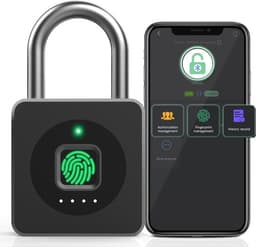
Anweller Anweller P6BF

Best overall

Anweller Anweller P6BF
6.6/10about £29.99
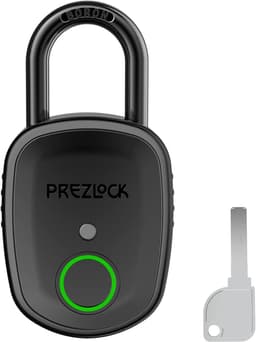
Prezlock Prezlock Pebble

Rank 2

Prezlock Prezlock Pebble
8.1/10about £59.95
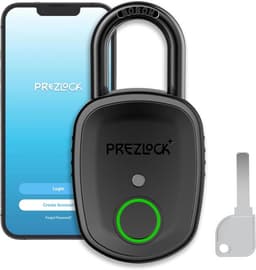
Prezlock Prezlock Pebble Plus

Alternative

Prezlock Prezlock Pebble Plus
7.5/10about £69
On this page

Charge it, then enrol two administrator fingers

Charge the lock before you follow an enrol diagram. Pebble reviews say it must be fully charged first. The included list names a cable and the bullets say none is supplied. One P8BF buyer returned the lock over Micro-USB. One P6BF port never accepted a cable. Enrol two dry fingers. Listing manuals often say any finger works until the first administrator prints are stored, which is why you test a finger you did not enrol while the shackle is free. If you are still deciding whether setup is realistic, start with the fingerprint padlock buying guide.

Add and remove people without sharing the key

A second person is another print, or a user in an app. The Pebble has no app, so you enrol them on the sensor, up to 100, or you hand them a key. On the Pebble Plus, add a test user you are willing to delete, because a setup mistake is hard to undo. The blue Anweller states two admin slots, and only an admin can reset it. If removal needs a factory reset, learn it while the lock is open. School apps and wet hands are on the gym locker fingerprint padlock page.
Anweller Anweller P6BF

Testsieger

Anweller Anweller P6BF
6.6/10about £29.99

Wake Bluetooth before you blame the app

Stand next to the lock, then touch the sensor before you decide the app is broken. The eSmartLock note says to touch until a light shows, and that Android may need location permission. The P6BF review matches that: the app will not open the lock until the pad is touched. The Pebble Plus line says Wi-Fi, and the bullets do not describe an unlock from work. Treat every app here as Bluetooth beside the lock. If the phone still cannot see it, charge the cell. Outdoor hasps are on the fingerprint padlock for a shed page.

A flat battery keeps the lock shut

A dead cell leaves the lock shut. The Pebble, the Pebble Plus, the P15 and the TenixLox include mechanical keys. The P6BF, the blue Anweller, the P8BF and the HS0480 do not, so recovery is a lead on the port. The HS0458 prints emergency code 33, which is not a secret. Store a key away from the door, and test it while the shackle is free. If the only recovery is USB, prove a power bank wakes the lock before you leave it on a locker.

The short test before first real use

Your finger opens it, a stranger’s finger does not, the key or the code works, the app can delete a test user, and the cable you will actually carry fits the port. Do that with the shackle free. If any of those fails on the kitchen table, the lock is not ready for a locker, a gate or a shed.

Common questions

Why does any finger open a new lock?
Many of these locks ship with no fingerprints stored, and the manuals say any finger works until the first administrator prints are enrolled. Enrol two dry fingers, then try a finger you did not store, before you lock anything important.
How do I add a second person?
On a lock with no app, enrol their finger, or give them a backup key if the box included one. On the app locks, add them while you are the admin and standing next to the lock. Delete a test user the same day so you know removal works.
What if I make a mistake during setup?
Stop while the shackle is still open. A Pebble Plus review says a setup mistake is hard to undo. Reset from the sheet if you still have admin control. If the lock is already shut and you have no key and no working port, do not reset it in the hope it will pop open.
How do I charge it, and what if the port does nothing?
Use the lead in the box if there is one, and a USB-C lead of your own for the Pebble, because the bullets and the included list disagree. The P8BF may be Micro-USB. If a port will not accept a cable, as one P6BF buyer found, that unit is a return, not a technique. Charge and test before the lock closes on your kit.
The app cannot see the lock. What now?
Touch the sensor until it wakes, stand close, and allow the location permission Android often asks for. If it still does not appear, charge the cell. Wi-Fi on a spec line is not remote unlock from another town.
The battery is flat and I am outside. What opens it?
A mechanical key, if your model included one. Otherwise a USB power lead on the port, if the port still works. On the HS0458, the listed emergency code is 33, which is not a secret. If you have none of those, the shackle stays shut. That is why the key lives somewhere other than behind the lock.
Do the lights mean the same thing on every brand?
No. The Ener-J manual uses a red blink for low battery and expects a 5 V USB charge. Your Prezlock or MYPIN sheet can use different colours. Follow the paper in the box, and do not copy a light sequence from a different brand’s PDF.

Related pages

Sources

Public UK sources and the amazon.co.uk listings used for this comparison. Last checked 19.10.2026.

  1. ProtectUK: locks (retrieved 19.10.2026)
  2. ProtectUK: security at home (retrieved 19.10.2026)
  3. Secured by Design: sheds and outbuildings (retrieved 19.10.2026)
  4. BSI: BS EN 12320:2021 (retrieved 19.10.2026)
  5. Sold Secure: ratings (retrieved 19.10.2026)
  6. Clarion: IP ratings (retrieved 19.10.2026)
  7. amazon.co.uk: Prezlock Pebble listing (retrieved 19.10.2026)
  8. Insight Security: choosing a padlock (retrieved 19.10.2026)