Independent comparisons. We may earn from shop links. More info

How to use an electricity meter plug

Updated: 22 October 2026

The tumble dryer has finished, the plug monitor is still in the socket, and the number on the screen is not yet a cost you can compare with the bill. This page is how to use an electricity meter plug so that one reading means one appliance. Peter F., the DIY & tools editor, wrote it on 22 October 2026 from the UK listings in this set and from public bill guidance. It stops at the socket. The two plugs in our [electricity meter comparison](/hub/measuring-equipment/electricity-meter) are the Awootsv PM04UK-1 and the KETOTEK KTEM03. Button names on other brands are not theirs. If you buy through a link to amazon.co.uk, we may earn a commission at no extra cost to you. We did not lab-test either meter.

The tumble dryer has finished, the plug monitor is still in the socket, and the number on the screen is not yet a cost you can compare with the bill.

Our top picks

On this page

Kilowatt-hours, then your unit rate

The measurement you want is kilowatt-hours. Watts are the speed. Ofgem describes a domestic bill as a unit rate plus a daily standing charge, charged even when you use nothing. A plug multiplies the kilowatt-hours it counted by the rate you type in. It does not know the standing charge. Citizens Advice notes that a supplier's in-home display can add that charge after midnight. A plug's cost is the appliance only. Take the unit rate from your own bill, in pence per kilowatt-hour. Ofgem's cap page for 1 October to 31 December 2026 shows an illustrative Direct Debit figure of 26.32 pence per kilowatt-hour and 54.83 pence a day standing charge, with no VAT on electricity from 1 October 2026 to 31 March 2027. That is a national illustration. Your region and tariff can differ. Type your number. Check the arithmetic once before you trust the screen. If the meter says 2.0 kWh and your unit rate is 28 pence, the appliance cost is 56 pence. If the plug shows something else, the rate was entered wrong, the mode is still on watts, or, on the Awootsv, you may be looking at a euro figure. One UK review says that cost display is in euros only. Write the kilowatt-hours down and multiply them yourself if the currency looks wrong.

One use, or a full day

A kettle is a short test. Reset the meter, boil once, and read the kilowatt-hours when it clicks off. Which? suggests resetting between intermittent uses so yesterday's toast is not inside today's figure. Some other brands need a pin in a hole for that reset. The Awootsv reviews say the reset is hard to reach. They do not describe a pin, so do not go looking for one that this listing never mentions. If you cannot clear it, note the starting kilowatt-hours and subtract. A fridge, a television on standby, or a broadband box needs a day, not a minute. A UK note on the Awootsv says a washing-machine reading climbs while the heater is on. That is the load. Leave the plug in for 24 hours. Do not multiply a one-minute watt reading by 24 and call it the daily total. Always-on loads need that full day as well. Compare a day with the box plugged in and a day with it out. A few percent of wander between runs is as much as these consumer plugs are showing you. You are not running a class test.

What these two plugs actually do

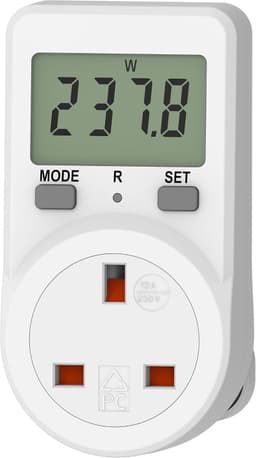
The Awootsv shows nothing until it is in a live socket. The listing says batteries are not required, and a UK review confirms a blank screen on the table. There is no backlight, so read it in a lit room or with a torch rather than guessing at night. It can store the unit price between uses, which reviewers like, and it claims to alarm and disconnect above 13 A. Plugs can feel tight. One unit flashed orange and died as a laptop charger was switched on. If the screen stays dead in a socket you know is live, stop using that unit. The KETOTEK puts a backlit LCD on a 2.9 m lead, with five buttons, a cost alarm, and a listing that says readings survive a power cut. The backlight lasts about 10 minutes. The overload is stated as 3680 W, which is the gadget's alarm, not a higher rating for a 13 A socket. A Mecheer-style sheet online tells its own owners to cut a 3680 W default. Those button names are not the KETOTEK's. Use the manual in its box. One of five UK reviews says the KETOTEK timer gained 17 to 18 minutes over a real 24 hours. Time a standby day with your phone, and read kilowatt-hours at the start and at the end.

Stop at the socket

A plug meter cannot see an oven, a hob, a shower, or a charger that is wired into the consumer unit. If you try to measure the house by plugging the monitor into a spare socket, you measure that spare socket. Extension leads add another limit: everything on the extension is inside the same 13 A plug, and a heater plus a kettle on that reel is how flex gets hot. Count one appliance. Unplug the others. When the load has no 13 A plug, change pages. The plug-in or DIN-rail guide is the fork, and the buying guide says who may open a board. For this reading: kilowatt-hours, your unit rate, a reset or a subtracted start, a day for anything that cycles, and your own clock if the KETOTEK is timing it.

Common questions

Where do I find the unit rate?
On your electricity bill or in the supplier's app, as pence per kilowatt-hour. Use the rate for the time of day you are testing if you are on a multi-rate tariff. Ofgem's 26.32 pence figure for October to December 2026 is an illustration of the Direct Debit cap, not your price. The standing charge is a separate daily line and does not go into the plug.
Does the cost on the plug include the standing charge?
It does not. The plug costs the kilowatt-hours it measured, times the rate you entered. The standing charge is billed even if that appliance is off, and a supplier in-home display may add it after midnight. Add the standing charge from the bill if you want a full day of household cost. Leave it out if you want the dryer alone.
How long should I leave a fridge or a TV on standby?
A full day of normal use, then read kilowatt-hours. A minute of watts, multiplied by 24, catches whatever the compressor or the heater happened to be doing. Which? makes the same distinction for always-on loads. Reset, or write down the start reading, so the previous appliance is not included. Repeat the day if the first result looks odd.
Why is the screen blank?
On the Awootsv the screen stays blank until the unit is plugged into a live socket, because the listing does not use a battery. A dark room is a second problem: the same listing says there is no backlight. If a live socket still leaves it dead, that unit has failed. One UK review describes a unit that flashed orange and died as a laptop charger started.
How do I reset without losing the price?
The Awootsv reviews say the reset is awkward to reach, and they also say the unit price can stay stored between uses. Clear the energy total if you can, and check that the price is still the one from your bill. If the control will not reset, subtract the starting kilowatt-hours from the finishing figure. Do not invent a pin reset for this model. Other brands use one. This file does not.
Why is the KETOTEK clock wrong?
One UK review, out of five, says the timer runs 17 to 18 minutes fast over 24 hours. The listing still claims a cumulative operating time. Use a phone or a wall clock for the length of the test, and use the meter for kilowatt-hours. The same listing says stored data survives a power cut, which does not correct a fast clock.
Can I measure the oven if it is hard-wired?
A plug monitor cannot. The oven never passes through the 13 A socket the meter occupies. Measuring a nearby spare socket only measures that socket. A wired circuit needs a DIN-rail meter or a clamp, fitted by someone competent, which is a different guide. Stop here if the appliance has no plug.

Related pages

Sources

Public UK sources from the research digest, last checked on 22 October 2026. Shelf prices and star lines are the amazon.co.uk figures captured with these nine listings. The price bands are this set, not a market average.

  1. GOV.UK: national regulation of gas and electricity meters (retrieved 22 October 2026)
  2. GOV.UK: MIR approved gas and electricity meters (retrieved 22 October 2026)
  3. Measuring Instruments Regulations 2016, regulation 3 (retrieved 22 October 2026)
  4. Ofgem: getting a smart meter (retrieved 22 October 2026)
  5. Citizens Advice: move your gas or electricity meter (retrieved 22 October 2026)
  6. GOV.UK: building work, replacements and repairs (retrieved 22 October 2026)
  7. BSI: BS 1363 13 A plugs and socket-outlets (retrieved 22 October 2026)
  8. NIE Networks: smart electricity meters factsheet, April 2026 (retrieved 22 October 2026)