Independent comparisons. We may earn from shop links. More info

How to use a digital angle finder

Updated: 22 October 2026

You have the finder in your hand, the offcut is still long enough to waste, and the screen is already showing a number you have not earned. How to use a digital angle finder comes down to three controls that are easy to mix up: zero, hold, and lock. This page follows the amazon.co.uk listings in the [digital angle finder comparison](/hub/measuring-and-marking-tools/digital-angle-finder) and public UK how-to notes. Peter F. did not lab-test the tools. A qualifying purchase can earn a commission at no extra cost to you. Button names differ by brand, so when a listing does not name the key, follow the sheet in the box.

You have the finder in your hand, the offcut is still long enough to waste, and the screen is already showing a number you have not earned.

Our top picks

Trend Trend DLB magnetic level box

Best overall

Trend Trend DLB magnetic level box
9.5/10about £19.95
Trend Trend DAR/200 200 mm rule

Best value

Trend Trend DAR/200 200 mm rule
9.1/10about £18.49
On this page

Zero means this face is now 0

Most of these tools can show an absolute tilt, a bit like a spirit level, and a relative angle that starts wherever you press zero. The job wants the second one. Put the tool on the face that should count as zero, press zero, and every later reading is a change from that face. The Neoteck vials are not a digital level. A hinged rule and a magnetic box do not share the next step. The rule opens onto two faces. The box moves from the reference surface onto the blade.

On a hinged rule

Close the rule, or lay it flat if the listing says so, and zero it before you open it onto the work. DAR/200 reviews describe the same habit: zero when the rule is closed, then open it onto the corner. Read the screen only once both arms are seated. A false number shows up when the tool is not sitting on the blade and the fence. Tighten a centre knob while the arms are still on the corner, then walk the locked rule to the saw. Hold freezes the digits. If you release the arms, that reading is a memory, not a shape you can transfer. The cut is often half the corner. That arithmetic is on the digital angle finder for skirting page. Prove the locked angle on an offcut before the board that has to fit.

On a magnetic box

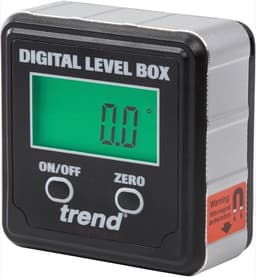
A box does not open. Zero it on the surface that matters, then move it. Trend's DLB how-to zeros the box on the saw table so a later reading on the blade is relative to that table. Expect about 90° when the blade is square to the table, or zero again if you want bevel to read from 0. Magnets are on one face, so a box that will not sit flat is on the wrong face. The XUNTOP claims four magnetic sides. UK reviews include a reading that changed when the gauge was lifted and put back. Unplug the saw before any gauge touches a blade. Where the magnet should sit is on the mitre saw page.

When the number looks wrong

A faint screen is often a tired cell. The DAR/200, Flintronic, and Pnoyws use a CR2032. The Neoteck uses one AAA. LIBAIDZ says batteries are not required and the power source is hand-powered, which fights the LCD, so do not invent a cell for it. A missed zero measures from the last surface, or from the factory absolute mode, while the corner is innocent. Close the rule, zero again, then put it on a square. UK reviews include readings several degrees off a square, and 90.4° against a stated ±0.3°. If the finder and the square disagree, do not cut the finished piece. A test cut on an offcut has to match both. Follow the saw's manual if you are not sure how that saw counts 0°.

Common questions

Where do I press zero?
On the face that should count as zero, not in mid-air. For a corner, that is often the closed rule, or the rule laid flat if the sheet says to zero horizontally first. For a saw, it is the saw table, before the box moves to the blade. Press the button the sheet calls ZERO, 0, or ON/OFF/ZERO. If the listing does not name it, use the diagram in the box.
What is the difference between hold and lock?
Hold freezes the digits. Lock, on a hinged rule, stops the arms so you can carry the angle to the saw. The Neoteck has both, and the listing says the knob will not hold the arms firm, so HOLD is only a memory of the number. DAR/200 reviews describe a centre knob that keeps the angle. A magnetic box has no hinge to lock. The magnet keeps it on the blade.
Why does a closed rule not read 0?
Because it has not been zeroed in this session, or the cell is low, or the arms are not fully shut. Flintronic tells you to zero on the flat before you measure. UK reviews of one unit include 1–2° when closed and 175° when opened flat. That is a faulty or unset tool, not a special mode. Zero again, then check a square. If it still misses, do not cut.
How long should I wait before I trust the digits?
The Kennedy manual on Cromwell asks for about six seconds of settle during its calibration routine. That pause is from that manual, not a figure printed for the DLB or the DAR/200. If your sheet says nothing, wait until the last digit stops ticking, then read. Do not average a moving display and call it the angle.
Can I use the same steps on a level box and a hinged rule?
You can share the idea of a relative zero. You cannot share the handling. The rule has to touch two faces and, if you are transferring, a lock has to hold the arms. The box sits on one reference, then on the blade, with the magnet on the plate. A cube in a skirting corner and a rule on saw teeth are the two mix-ups. Use the sequence that matches the tool in your hand.
What if the screen is faint?
Replace the cell the listing names before you blame the angle. A CR2032 cover on the DAR/200 is a known weak point, and one buyer snapped a tab, so do not force the plastic. LEXIVON reviews mention a screwed cover and a spare cell. Auto-off on several rules is about six minutes, which looks like a dead screen. If a new cell is still faint or missing segments, treat the unit as faulty.

Related pages

Sources

Public UK sources and the amazon.co.uk listings compared on this page. Listings captured 19 October 2026.

  1. Trend DAR/200 digital angle rule (retrieved 19 October 2026)
  2. Trend DLB digital level box (retrieved 19 October 2026)
  3. Trend, how to use a DLB digital level box (retrieved 19 October 2026)
  4. GOV.UK laser radiation safety advice (retrieved 19 October 2026)
  5. Consumer Rights Act 2015, section 22 (retrieved 19 October 2026)
  6. HSE, PUWER overview (retrieved 19 October 2026)
  7. Wickes, how to fit skirting (retrieved 19 October 2026)