Independent comparisons. We may earn from shop links. More info

Stream controller setup for blank keys

Updated: October 2026

The pad is plugged in, the keys show a logo or a blank screen, and nothing has run. Stream controller setup for blank keys starts with one assigned action, then the installer that matches the brand on the box. Elgato, SOOMFON, and STREONOR do not share a setup path. The pads are the seven in our [stream controller comparison](/hub/diy-supplies/stream). Peter F. used Elgato’s blank-key page of 23 June 2026 and the amazon.co.uk extracts, and did not lab-test a unit. A qualifying purchase through our links can earn a commission at no extra cost to you.

The pad is plugged in, the keys show a logo or a blank screen, and nothing has run. Stream controller setup for blank keys starts with one assigned action, then the installer that matches the brand on the box.

Our top picks

Elgato Elgato Stream Deck Neo

Best overall

Elgato Elgato Stream Deck Neo
9.6/10about £69.99
Elgato Elgato Stream Deck Mini

Preis-Tipp

Elgato Elgato Stream Deck Mini
9.4/10about £49.99
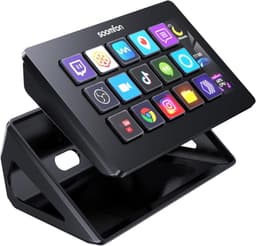
SOOMFON SOOMFON 15-key deck, black

Alternative

SOOMFON SOOMFON 15-key deck, black
8.4/10about £69.99
On this page

One key, one action, before a whole profile

Open the app that belongs to your pad and drag one action onto one key. A mute, an app launch, or a shortcut you already use is enough. Stop there until that key changes its icon and the action runs. A folder of scenes and a second page, built before the first key works, only hides the fault. If the key stays on the logo after you have assigned something, the next checks are the app and the cable. A logo is not a fault while no action is assigned. Icon packs, which dominate a lot of UK search results, come after a key that the software has actually seen.

Elgato blank-key checks

These checks are for the Mini, the Neo, the MK.2, and the XLR bundle, because those four use Elgato’s app. Elgato’s help page of 23 June 2026 says the app has to be running, the cable should go to the computer, and a key stays blank until an action is assigned. Closing the app returns the keys to a logo. Use a port on the computer. A UK Mini review linked a hub to flicker. If the logo remains, Elgato names Citrix Workspace App 2302 as a known conflict. On a Mac, hotkeys need Accessibility permission. Without that tick, the icon can look right while the shortcut never fires.
Elgato Elgato Stream Deck Neo

Testsieger

Elgato Elgato Stream Deck Neo
9.6/10about £69.99

OBS on an Elgato pad only

Elgato’s UK page for the OBS Studio plugin asks for Stream Deck 6.9, on Windows 11 or macOS 13. You still assign one scene, with OBS open, before you add a multi-action. The plugin does not fill the keys because the pad is plugged in. Do not point a SOOMFON or STREONOR owner at it. Their listings use their own downloads. One SOOMFON reviewer said to use OBS rather than Streamlabs. That is one review, not a test of every build. If you are unsure which app you installed, see Elgato Stream Deck versus SOOMFON and STREONOR.

SOOMFON’s download address and STREONOR’s cable rule

SOOMFON’s bullets tell you to download drivers from an address in the browser. They do not say the pad runs Elgato’s app. UK reviews say the address printed on the device pointed at the wrong version. Use the current SOOMFON download for Windows 10 64-bit or higher, or macOS Catalina 10.15 or higher. The white information card is display-only. STREONOR’s notes say to close other stream-controller software first, to use the original cable, and to avoid hubs. Linux is not supported. If Elgato’s app is still open, the S15 can look dead when the cable is fine. Call keys without an OBS scene are on stream controller for Zoom and Teams.

Common questions

Why do the keys show the Elgato logo and nothing else?
On an Elgato pad the logo is what a key shows before an action is assigned, and also what you see when the app is closed. Assign one action, leave the app open, and put the cable in the computer rather than a hub. If the logo remains, Elgato’s page of 23 June 2026 names Citrix Workspace App 2302 as a known conflict. Check that before you assume the pad is dead.
Will a USB hub do, or does the lead need a port on the computer?
Use a port on the computer. Elgato’s blank-key page says the cable should go there. A UK Mini review linked a hub on a MacBook to flicker. STREONOR’s listing says to avoid hubs and to use the original cable. The Mini’s table lists both USB-C and Micro USB, so a spare lead may be the wrong plug. A UK review says the Neo is USB-C and needs an adapter on a PC without that port.
I use a Mac. Why do hotkeys not fire?
Hotkeys on a Mac need Accessibility permission for the controller app. The pad can show the right icon and still do nothing if that tick is off. Grant it to Elgato’s app, or to SOOMFON’s or STREONOR’s, then press the key again. Thin Mac scenes in the SOOMFON reviews are a missing preset, which is a different fault from a missing permission. An employer Mac that blocks Accessibility needs the administrator, not another download.
Where do SOOMFON drivers come from if the address on the pad is wrong?
From SOOMFON’s own download in the browser, not from Elgato’s Marketplace. UK reviews say the printed address pointed at the wrong version. Match the installer to Windows 10 64-bit or higher, or macOS Catalina 10.15 or higher. If only one USB port on the computer is recognised, try another port on the machine before you add a hub. The white listing repeats the same reviews, so it does not add a second download path.
Why must I close another controller app before the STREONOR software?
STREONOR’s listing says to close or uninstall other stream-controller software first. A second app can hold the keys, which looks like a dead pad. Quit Elgato’s app, then open STREONOR’s software with the original cable in a port on the computer. Linux is outside the bullets. The plugin store still needs an account after the pad is seen. A slow search is a review complaint, not a reason to skip the account.
Does Elgato’s OBS plugin install on SOOMFON or STREONOR?
No. Elgato’s UK OBS page is for Stream Deck 6.9 on Windows 11 or macOS 13, and it belongs to Elgato’s app. SOOMFON and STREONOR ship their own software. One SOOMFON reviewer said to use OBS rather than Streamlabs. That comment does not move Elgato’s plugin across. Use the installer named on your own listing.

Related pages

Sources

Elgato’s range and help pages, the Consumer Rights Act 2015, and the GOV.UK note on the Electrical Equipment (Safety) Regulations 2016. Prices and star counts are the amazon.co.uk extracts used for the scores dated 15 October 2026. Shelf prices move.

  1. Elgato, which Stream Deck to get (retrieved 15 October 2026)
  2. Elgato help, Stream Deck software system requirements, 25 June 2026 (retrieved 15 October 2026)
  3. Elgato help, blank keys, 23 June 2026 (retrieved 15 October 2026)
  4. Elgato, Zoom certification (retrieved 15 October 2026)
  5. Elgato, Microsoft Teams controls (retrieved 15 October 2026)
  6. Elgato help, original XLR Dock specifications (retrieved 15 October 2026)
  7. Consumer Rights Act 2015, section 22 (retrieved 15 October 2026)
  8. GOV.UK, Electrical Equipment (Safety) Regulations 2016 (retrieved 15 October 2026)