Independent comparisons. We may earn from shop links. More info

Fingerprint reader for a desktop PC

Updated: 20.10.2026

Your tower or mini PC has no fingerprint sensor, so a fingerprint reader for a desktop PC has to live where your hand already is, on a USB port Windows will actually use. A nano dongle in a rear socket under the desk fails that test before the brand matters. This page stays on cable length, hubs, the power-button claim, and the one listing that states Enhanced Sign-in Security. Lengths and prices are amazon.co.uk lines from 19 October 2026, except where a sentence names Kensington’s UK page. The listings are the [fingerprint scanner comparison](/hub/burglar-protection/fingerprint-scanner). Peter F. compared those listings. A qualifying purchase can earn us a commission at no extra cost to you.

Your tower or mini PC has no fingerprint sensor, so a fingerprint reader for a desktop PC has to live where your hand already is, on a USB port Windows will actually use.

Our top picks

On this page

A sensor on the desk, not on the back of the tower

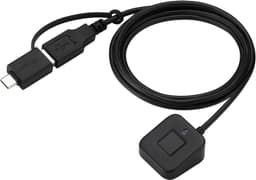
A desktop reader earns its place when you can touch it without crawling behind the case. The ARCANITE AKFSD-07 is 9 g and about 2 cm long. The TNP is 5.1 g and 21 mm by 17 mm. Both suit a laptop port you can see. On a tower they disappear into the rear panel. The listings that state a 1.5 m cable are the Anskyloe WH01 at £26.99, both JIANBOLAND readers (£25.99 with 3.5 from 320 ratings, and £28.99 with no star line), the Tosuny at £49.37, and the Gugxiom at £20.59. Measure from the port you will use to the spot where your hand rests. The amazon row for the Kensington VeriMark Desktop 2.0 leaves cable length blank. Kensington’s UK page quotes 1.2 m, and that figure stays on the manufacturer page.

Plug into the computer first

UK reviews here fail hubs more often than they fail the idea of a fingerprint. A KamKorda review says three hubs were not recognised and a direct port on the PC worked. ARCANITE owners describe the same split between ports. The first sign-in test is a socket on the case, with the hub unplugged. A mini PC is the same reach problem in a smaller box. Mini PCs often hide their ports behind a monitor arm. A 1.5 m lead still helps, and a nano dongle still works if one port faces you. After the finger unlocks Windows from a direct port, you can try a powered hub. If the hub fails, keep the reader on the case port.
ARCANITE ARCANITE AKFSD-07

Testsieger

ARCANITE ARCANITE AKFSD-07
8.0/10about £37.22

The power-button reader is a desktop-only extra

The Anskyloe WH01 tries to be a power button as well as a sensor. It describes a Y-split so the reader can stand in for the desktop power switch, and it says that power-button function is not supported on laptops. The fingerprint function is advertised more widely than the power button. The amazon.co.uk line is 2.3 from 3 reviews, so the Y-split is a claim with almost no public trial. A power-button passthrough means opening the case and finding the front-panel header. If you are unsure which pins are the power switch, leave the case button connected and use the reader only as a fingerprint device. The £25.99 JIANBOLAND has the same 1.5 m idea and 320 ratings, without a power-button promise.

When the ESS desktop reader is the one to look at

A desktop on Windows 11 meets the same Enhanced Sign-in Security rule as a laptop. If that mode is on, a Hello cable can stay missing from Sign-in options until you turn the mode off, and turning it off removes existing enrolments and passkeys. The only listing here that states the mode is the Kensington VeriMark Desktop 2.0, model K64741WW, at £76.19, with USB-C and USB-A, 1.5 × 2.9 × 2.9 cm, and 60 g. The raw amazon file has no star line. Choose that Kensington when the setting has to stay on, and take the 1.2 m cable from Kensington’s site. Choose the £25.99 JIANBOLAND when you have decided the setting can be switched off and you want the large review sample. The passkey warning is on the enhanced sign-in security page. Once Windows lists the reader, enrolment is the Windows Hello setup walkthrough.

Common questions

Can the Anskyloe replace the case power button?
The listing says the Y-split can act as a desktop power button, and it says that function is not supported on laptops. A separate bullet still mentions desktops and laptops for the reader. The star line is 2.3 from 3 reviews. If you are not confident with the front-panel header, use it only as a fingerprint reader.
Is a mini PC the same problem as a tower?
The problem is reach and a port Windows will use. Reviews on the £25.99 JIANBOLAND include a Windows 11 mini desktop. If the ports are behind a monitor, a 1.5 m lead is still the practical shape. If one port faces the chair, a nano reader is enough.
Which listing states both USB-C and USB-A?
The Kensington VeriMark Desktop 2.0 bullets name USB-C and USB-A. The Tosuny listing also claims both. The other cabled readers state USB without naming both plugs. Match the lead to the port on the case before you add an adapter, because an adapter is another joint in the first test.
Does a desktop still need a PIN?
Windows Hello still requires a PIN on a desktop account. The finger is the quick unlock, and the PIN is the fallback when the pad rejects a cold or damp hand. Set a PIN you can remember, then enrol the finger.
What if the reader works only in one rear port?
Keep it in the port that works, and use a 1.5 m cable so the sensor still reaches the desk. ARCANITE reviews already describe this port split on nano dongles. Moving a working reader onto a hub, only to tidy the rear panel, can put you back to a reader Windows cannot see.

Related pages

Sources

Public UK sources for this comparison, last checked on 19.10.2026. Prices and star lines are from the amazon.co.uk listings on that date.

  1. ICO: biometric data for time and access control (retrieved 19.10.2026)
  2. ICO: how to process biometric data lawfully (retrieved 19.10.2026)
  3. Microsoft Support: third-party fingerprint readers and Windows Hello (retrieved 19.10.2026)
  4. Microsoft Learn: Windows Hello biometric requirements (retrieved 19.10.2026)
  5. Microsoft Learn: Windows Hello Enhanced Sign-in Security (retrieved 19.10.2026)
  6. NCSC: using biometrics (retrieved 19.10.2026)
  7. Kensington UK: VeriMark Desktop 2.0 (retrieved 19.10.2026)
  8. Consumer Rights Act 2015 (retrieved 19.10.2026)