Independent comparisons. We may earn from shop links. More info

Enhanced sign-in security and a fingerprint reader

Updated: 20.10.2026

Your fingerprint reader is plugged into a Windows 11 PC, the box said Windows Hello, and Sign-in options still has no fingerprint control. That is the enhanced sign-in security fingerprint reader problem: a mode that accepts only certain sensors, and a shelf of dongles that never mention it. This page is the decision in front of the toggle, including what happens to passkeys if you turn it off. The shelf is the [fingerprint scanner comparison](/hub/burglar-protection/fingerprint-scanner). The procedure is Microsoft’s UK support note for third-party readers. Peter F. checked that note against the listings. A qualifying amazon.co.uk purchase can earn us a commission at no extra cost to you.

Your fingerprint reader is plugged into a Windows 11 PC, the box said Windows Hello, and Sign-in options still has no fingerprint control.

Our top picks

On this page

Why Windows 11 hides a reader the box called compatible

Windows Hello on the box means the seller expects the dongle to enrol a finger. Enhanced Sign-in Security is narrower. Microsoft describes the match as happening in a more protected way, tied to the PC’s security hardware. A reader that never states the mode can stay invisible while the mode is on. On Windows 11 version 24H2, a non-ESS reader needs the mode turned off before Windows will use it. On version 23H2 the related control is worded around signing in with an external camera or fingerprint reader. The rollout is phased, so your PC may not show the toggle. A review of the £25.99 JIANBOLAND names enhanced Windows biometric security as the block. A VBESTLIFE review describes a different switch, external fingerprint devices, as off until they were enabled.

What you lose if you turn the toggle off

Turning Enhanced Sign-in Security off is a documented Microsoft step. Enrolments made under that mode are removed. Passkeys already on that PC are removed. Microsoft says you can set them up again afterwards. Note the accounts, especially email and banking, before you flip the switch. Turning the mode off does not make the fingerprint safer. It makes a wider set of USB readers eligible, and it drops the stricter path on that PC. Leaving the mode on, and returning a reader whose listing never stated support, is the other honest choice. Once Windows lists the reader, the clicks are on the Windows Hello setup page.
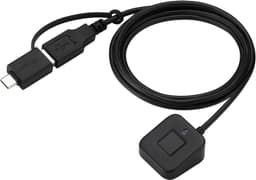
ARCANITE ARCANITE AKFSD-07

Testsieger

ARCANITE ARCANITE AKFSD-07
8.0/10about £37.22

The reader that states ESS in this set

One amazon.co.uk listing in this set states the mode. The Kensington VeriMark Desktop 2.0, model K64741WW, at £76.19, names Microsoft SDCP and Windows Hello Enhanced Sign-in Security, with USB-C and USB-A and Windows on Intel and ARM. The saved listing has no star rating. Buying it does not restore passkeys already removed by turning the mode off. The older VeriMark Desktop does not support the mode. A title without Desktop 2.0 or K64741WW is a different buy. No other USB reader here states the mode, including the ARCANITE at 4.3 from 4,749 ratings. That record shows many people sign in with it. It does not show that the enhanced mode accepts it.

When you should not change the setting

Leave the toggle alone on a work PC unless IT has told you to change it. A company image often enables the mode on purpose. If the toggle is missing, wait or ask. A phased rollout is not a hidden menu you should force with a script. Any guide that tells you to disable BitLocker, change a BIOS password, or turn off Secure Boot is asking you to weaken disk and boot security. On your own Windows 11 machine, the toggle is a legitimate choice if you accept the passkey loss and Microsoft’s page matches the menus you see. If you would rather keep passkeys and the stricter mode, return the reader and look at the VeriMark Desktop 2.0. That trade-off sits on the buying guide.

Common questions

Why does a Windows Hello dongle not show in Sign-in options?
With Enhanced Sign-in Security on, Microsoft says a third-party reader that does not support the mode can stay blocked until you turn the mode off. The box can still say Windows Hello. Use a USB port on the PC, then look for the control on Microsoft’s UK support page. The toggle can also be missing because the rollout is phased.
What happens to passkeys if you turn ESS off?
Microsoft’s UK note says existing Enhanced Sign-in Security enrolments are removed and passkeys on that PC are removed. You can set them up again afterwards. List the accounts that use passkeys, especially banking and email, before you change the setting. The fingerprint you add later does not restore those passkeys.
Which reader in this set states ESS support?
The Kensington VeriMark Desktop 2.0, model K64741WW, at £76.19 on 19 October 2026, states Enhanced Sign-in Security and SDCP. The saved listing has no star line. The other USB readers here, including the ARCANITE with 4,749 ratings, do not state the mode.
Is the older VeriMark Desktop the same?
The older VeriMark Desktop does not support Enhanced Sign-in Security. Desktop 2.0 and the model code K64741WW are the identifiers that match the claim. A similar Kensington name without that code is a different product.
What if the toggle is not there?
Microsoft describes the rollout as phased, so the control can be absent on a PC that otherwise looks current. On 23H2, look for wording about signing in with an external camera or fingerprint reader. If neither control exists, leave unofficial tools alone and use a PC that already shows the setting, or wait.
Should a work PC be changed without IT?
Leave a work PC on the policy it shipped with unless IT has agreed. Enhanced Sign-in Security on a company machine is often deliberate. If Sign-in options is locked, the reader is not yours to force.
After ESS is off, where do you enrol?
After Windows shows the fingerprint control, use Settings, Accounts, Sign-in options, and the fingerprint prompt, with the PIN created first. A restart may follow the toggle. A reader that is still missing after Microsoft’s documented step is a return, not a BIOS project.

Related pages

Sources

Public UK sources for this comparison, last checked on 19.10.2026. Prices and star lines are from the amazon.co.uk listings on that date.

  1. ICO: biometric data for time and access control (retrieved 19.10.2026)
  2. ICO: how to process biometric data lawfully (retrieved 19.10.2026)
  3. Microsoft Support: third-party fingerprint readers and Windows Hello (retrieved 19.10.2026)
  4. Microsoft Learn: Windows Hello biometric requirements (retrieved 19.10.2026)
  5. Microsoft Learn: Windows Hello Enhanced Sign-in Security (retrieved 19.10.2026)
  6. NCSC: using biometrics (retrieved 19.10.2026)
  7. Kensington UK: VeriMark Desktop 2.0 (retrieved 19.10.2026)
  8. Consumer Rights Act 2015 (retrieved 19.10.2026)