Independent comparisons. We may earn from shop links. More info

How to install a smart thermostat

Updated: October 2026

You are about to take an old programmer or room thermostat off the wall and put a smart one in its place. The safe version of that job is a like-for-like swap: same cables, power off, the maker’s diagram, then the app. It stops being a weekend job when the boiler’s front panel has to come off, when the wires do not match, or when the work is on the gas side. This is the order of work for how to install a smart thermostat, not a ranking. Product choices sit on the [smart home thermostat comparison](/hub/thermostats/smart-home-thermostat). Nothing below is a terminal-by-terminal wiring diagram. Peter F. used the amazon.co.uk listings from 16 October 2026 and did not run a lab test. A purchase through our links can earn a commission at no extra cost to you.

You are about to take an old programmer or room thermostat off the wall and put a smart one in its place. The safe version of that job is a like-for-like swap: same cables, power off, the maker’s diagram, then the app.

Our top picks

On this page

What you can swap yourself

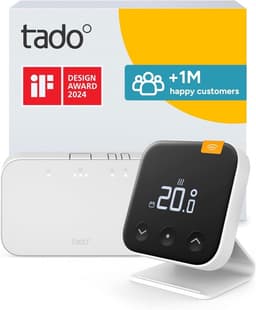
A like-for-like room thermostat or programmer is the job people complete from the app’s cable guide. You photograph the old wires, isolate at the consumer unit, and land the same conductors on the new receiver or backplate where the diagram shows a match. The tado listings that include a receiver or Bridge X are built around that kind of swap. Reviews of the wired X 2nd gen starter praise the in-app wiring diagrams. That praise is about a guided swap, not about opening the boiler. A radiator head is a smaller job again. You remove the old TRV head, fit the adapter if the body is not already the right thread, and pair the head to a network you already have. The SONOFF TRV Gen2 ships with six adapters, and reviews mention a direct fit on some Drayton bodies and M30 x 1.5 among the others. The tado X trio is the same class of product: three heads, no receiver. Neither head fires the boiler. If the boiler still needs a call for heat, a head-only afternoon has not installed a smart thermostat. Mains kits are not battery toys. The Hive kit is listed at 230 V, with four AA batteries as well. The SONOFF wall thermostat is 240 V. The V3+ bridge uses a UK adapter at 230 V, while the room sensor takes three AAA cells. Treat the receiver, the hub, and the wall stat as mains equipment even when the dial in your hand is battery powered. If the existing cable has a different number of cores from the diagram, stop. Do not invent a conductor that is not in the wall.

The order of work

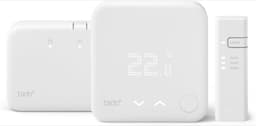
Switch the heating off, then isolate at the consumer unit so the boiler and the controls are dead. Confirm the circuit is dead before you lift the old stat. A fused spur that usually kills the boiler is not a substitute for knowing which breaker you opened. Photograph every terminal, including the colours and any link wires, before you disconnect. Name what you have in the app, then follow that app’s steps. Use the maker’s diagram for your kit, not a forum photo of a different receiver. For the V3+ starter you are placing three parts: the sensor, the Internet Bridge, and the wireless receiver. The bridge wants the UK adapter and the Ethernet cable that are in the box. For Hive, reviews describe the hub and a receiver; put the hub where it can reach the router, and the receiver where the boiler controls already are. For the wireless tado X starter, the listing says the Wireless Receiver X is the part at the boiler and that no extra hub is required. Power back on only after the terminals are closed up. Then pair. Reviews of the wireless X starter include 2.4 GHz trouble on dual-band Wi-Fi. Join the phone, and the bridge or hub, on the 2.4 GHz network rather than a 5 GHz-only name. The 2.4 GHz Wi-Fi note is the pairing limit, not a reason to open the boiler. On the wired X 2nd gen starter, some buyers needed more than one factory reset before the app accepted the thermostat. On Hive, some reviews describe a hub or receiver reset before the app would see the unit. The wired add-on at £79.99 is the classic wrong-box failure. It has no Bridge X. If the app has nothing to join, you bought a second zone for a system that does not exist yet. Go back to the smart thermostat buying guide before you reorder.

Where you stop

Stop when the next step is the boiler’s front panel. Glow-worm’s homeowner guidance is blunt about that panel: a Gas Safe registered engineer is the person who removes it. Gas work belongs to a registered engineer. Gas Safe Register’s home-improvements guidance says you must not have an unregistered person do the gas work and then have someone else sign it off. The Health and Safety Executive makes the same point for landlords: you cannot treat an unregistered job as finished because a name appears on the paperwork later. Stop when you cannot match the wires. An S-plan or Y-plan system, with zone valves and a separate hot-water channel, is where a confident swap becomes guesswork. That confusion is a heating engineer’s visit, not another video. Part P, in England and Wales, does not make every thermostat replacement notifiable. The IET’s Part P FAQ points notifiable work at jobs such as a new circuit, under BS 7671, rather than at every like-for-like control swap. A new circuit, or work in a bathroom zone that the regulations treat as special, is the point where you want a competent electrician. Scotland and Northern Ireland are not covered by the England circular or by Part P as written for England and Wales. If you are there, use the gas-registration and electrical rules that apply where the house is. If you are a landlord, do not do the gas side yourself to save the call-out.

After it is on the wall

Set a schedule before you subscribe to anything. On the V3+ kit, reviews say the timetable works without Auto-Assist at £3.99 a month, even though the app pushes the upgrade. On the wireless X starter, AI Assist is listed at £3.99 a month or £29.99 a year, and reviews say geofencing and open-window detection are that paid layer. Turn those on only if you want them. A schedule that matches when the house is occupied is the control the Energy Saving Trust is describing, not the subscription screen. Give the system a day before you decide the sensor is wrong. Radiator heads in this set read warm because they sit on the radiator: reviews of the tado X trio put that gap at about 3–4°C. A wall sensor in the hallway will not match a head on a sitting-room radiator, and that is not a failed install. If the heating never calls, check the breaker, the receiver’s power light, 2.4 GHz, and whether you bought an add-on. If the boiler itself will not light, or you smell gas, leave it off and call a Gas Safe registered engineer.

Common questions

Do I isolate at the consumer unit before I lift the old stat?
Yes. Turn the heating off, then isolate at the consumer unit and confirm the controls are dead before you remove the old thermostat. Photograph the terminals first. A receiver or hub that is still live is mains equipment, even when the new room sensor takes AAA batteries. The Hive kit and the SONOFF wall stat are explicitly mains products.
When is this Gas Safe rather than DIY?
When the work is on the gas appliance, including taking the boiler’s front panel off. Gas Safe registration is the route for that work in Great Britain, and an unregistered person cannot do it for a registered engineer to sign later. Matching a like-for-like thermostat cable with the app’s diagram is the DIY side. If you are unsure which wires you have, stop and book a heating engineer.
Can I remove the boiler’s front panel?
No. Glow-worm tells homeowners that a Gas Safe registered engineer is the person who takes that panel off. If the instructions for your kit seem to require it, that is the moment the job leaves DIY. Do not prop the panel open to have a look at the gas valve.
Where do the hub, the bridge, and the receiver go?
The receiver belongs with the boiler controls. The hub or bridge belongs where it can reach your router: Ethernet for the V3+ bridge, using the cable in the box. Hive reviews point to the hub near the router and the receiver by the boiler. The wireless tado X listing says the Wireless Receiver X covers the boiler link and that you do not add a separate hub.
Why will the app not see the receiver on dual-band Wi-Fi?
The wireless X starter’s reviews include 2.4 GHz pairing trouble. A phone sitting on a 5 GHz network can fail to join a device that only uses 2.4 GHz. Put the phone and the hub on the 2.4 GHz network, then retry. On the wired X starter, a factory reset is the other step reviewers repeated before the app accepted the unit. Hive reviews describe a similar hub or receiver reset.
The add-on has no internet part. Did I buy the wrong box?
If this is your first tado thermostat, yes. The wired Smart Thermostat X add-on does not include Bridge X. The listing says you need a Thread border router. It is the right box only as a second zone or a wet underfloor head on a tado X system that already has that router. It will not become a starter because you wait longer in the app.
What should a landlord not do themselves?
A landlord should not carry out gas work or ask an unregistered person to do it. The HSE is clear that landlord gas safety checks belong with a registered engineer, and that unregistered work cannot be laundered by a later signature. A like-for-like control swap that does not open the boiler is a different task. If the tenancy property needs the boiler case open, book a Gas Safe registered engineer.

Related pages

Sources

Public UK sources for Energy Saving Trust savings, Boiler Plus in England, Part L, and Gas Safe. Listings are the amazon.co.uk captures for these eight ASINs on 16 October 2026. Prices on amazon.co.uk move.

  1. Energy Saving Trust, thermostats and heating controls (retrieved 16 October 2026)
  2. Energy Saving Trust, take control of your heating (retrieved 16 October 2026)
  3. Boiler Plus circular (2018) (retrieved 16 October 2026)
  4. SI 2026/335 (retrieved 16 October 2026)
  5. Approved Document L (2026) (retrieved 16 October 2026)
  6. Gas Safe Register, home improvements (retrieved 16 October 2026)
  7. Hive shop, thermostat (retrieved 16 October 2026)
  8. tado compatibility (retrieved 16 October 2026)