Independent comparisons. We may earn from shop links. More info

How to fit a telephone socket

Updated: October 2026

You have a secondary or a replacement faceplate, the line still has a split master, and you want the new point to ring without opening the wrong half of the Openreach box. This is how to fit a telephone socket on the customer side: the cable, the terminals these listings actually use, and the test that shows whether the fault is yours. Role is already chosen on [master or secondary telephone socket](/hub/sockets-and-extension-leads/telephone-socket/sub/telephone-socket-master-or-secondary). The plates are on the [telephone socket comparison](/hub/sockets-and-extension-leads/telephone-socket). If the phone already plugs into the router, stop at [telephone socket on full fibre](/hub/sockets-and-extension-leads/telephone-socket/sub/telephone-socket-full-fibre).

You have a secondary or a replacement faceplate, the line still has a split master, and you want the new point to ring without opening the wrong half of the Openreach box.

Our top picks

On this page

Stop before you unscrew

BT tells you not to unscrew a main socket with no horizontal bar. The test socket sits behind the lower half of a plate that does split. On an NTE5c the lower panel clips off. On an older NTE5a you remove screws on that lower plate only. The incoming pair in the sealed part of the NTE stays Openreach property. If you cannot see a split, do not invent one with a screwdriver. Stop if the job has become a new 13 A circuit or the cable would enter a bathroom. Keep new telephone cable at least 50 mm from mains, or use a rigid non-conducting barrier. Stop if a digital switch is booked and a telecare alarm shares the line. The buying guide matches a plate to the box.

Cable and terminals

Run solid-core twisted pair. CW1308 is the BT specification for internal telephone cable. Stranded alarm cable is the usual IDC mistake. Do not strip CW1308 for IDC or a cam lock. Screw terminals are the exception: you dress the conductor for the screw. Join terminal 2 to terminal 2 and terminal 5 to terminal 5, the same pin at the master and at each secondary. Terminal 3 is the bell wire, often orange/white. The 1STec kit says connector 3 is not needed for broadband. Leave it off only if the phones still ring. If the extensions go quiet, restore that wire. Swapping 2 and 5 can leave a phone ringing continuously. This page is not a procedure for the incoming pair on the network side.

Screw, punch-down, or cam lock

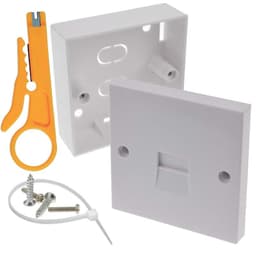
The white BG secondary, B004TRRVA2, and the screw masters B004TRRV48 and B07KGHMVKB need a screwdriver, not a punch-down tool. Several buyers of the £3.89 plate had expected IDC, and one calls the screws minute. The 1STec kit, B08L6G7XZJ, includes an IDC tool and a back box for unstripped CW1308. The plate is about 68 mm, so it will not cover an 85 mm NTE. One reviewer’s screws kept spinning. Stop forcing them. The NTE5c faceplate, B07WR6YBZ7, claims tool-less cam locks and says faceplate only. Reviewers report screws that were too short and a plate that would not click. If the new screws are short, refit the originals. The DRUT secondary does not state screw or IDC, so do not strip the cable until the plate is in your hand.

Prove it at the test socket

Unplug every telephone, filter, and router lead first. BT’s test-socket steps are for copper and fibre-to-the-cabinet, not full fibre. Remove only the lower half of a plate with a horizontal bar. Plug a known-good phone, or the filter and router, into that socket alone. A pass means the incoming line is good and the fault is on your side. A fail, with every extension unplugged, is the provider’s side, and it is still not a reason to open the sealed half. If only the new secondary is dead, check terminals 2 and 5, then terminal 3 if nothing rings. If you still cannot separate the line from the house wiring, stop. A qualifying purchase can earn a commission at no extra cost to you.

Common questions

Do I strip CW1308 for IDC?
No. IDC and the NTE5c cam locks take unstripped solid-core cable. The contact cuts the insulation. Strip only for a screw terminal, such as the BG secondary or the BG screw masters. Stranded alarm cable is the usual IDC failure. If that cable is already in the wall, a screw plate is the closer match, or you replace the run with CW1308.
How do I open the test socket?
Unplug the extensions. Remove only the lower half of a master that has a horizontal split. NTE5c panels clip. Older NTE5a lower plates unscrew. Leave the sealed upper part alone. If the plate has no horizontal bar, BT says do not unscrew it. A faceplate that will not clip back is a fixing problem, not a cue to open the network side. A 68 mm one-piece plate is not a hidden test socket.
What if the new plate is fitted and the phone is dead?
Repeat the test with every extension unplugged. If a known-good phone works in the test socket, the line is good and the fault is your wiring, a filter, or the new plate. Check terminals 2 and 5, then the bell wire if nothing rings. If screws are short or a plate will not click, refit it before you retest. If the test socket fails as well, contact the provider. Do not open the sealed half to hurry that visit.
Which tool does this set need?
The BG screw plates need a screwdriver. The 1STec 68 mm kit includes an IDC tool. The NTE5c faceplate claims you close the cam locks by hand. One reviewer still wished that pack had included a tool. The DRUT secondary does not state the terminal, so the tool is unknown until you see the back. None of these is a job on a 13 A circuit.
When do I stop and call someone?
Stop if the drop or the sealed network side is damaged, if you cannot find a split master, or if a telecare alarm shares a line with a booked switch-off. Stop if the work is a new mains circuit or enters a bathroom. A plate that does not click is your fixing to sort or to return. It is not a reason to lever the Openreach box apart. The provider deals with the line up to the NTE.

Related pages

Sources

Public UK sources on the master socket, BS 6312, and the digital landline switch. Listings checked 16 October 2026. Prices on amazon.co.uk move.

  1. Openreach copper handbook (retrieved 16 October 2026)
  2. Openreach new-sites wiring, August 2024 (retrieved 16 October 2026)
  3. Openreach PSTN switch-off (retrieved 16 October 2026)
  4. GOV.UK telecommunications modernisation timeline (retrieved 16 October 2026)
  5. Ofcom, future of landline calls (retrieved 16 October 2026)
  6. Ofcom, broadband and landline faults (retrieved 16 October 2026)
  7. BSI BS 6312-1:1994 plugs (retrieved 16 October 2026)
  8. BT Digital Voice setup (retrieved 16 October 2026)