Independent comparisons. We may earn from shop links. More info

How to connect Hydrawise Wi-Fi

Updated: 23 October 2026

The wireless list shows every network except the one your phone uses, and the missing name is usually the 5 GHz band. How to connect Hydrawise Wi-Fi means a 2.4 GHz network on a channel from 1 to 11, a WPA2 password, and a status line that says connected. You already have a compatible controller and a home router. This page does not rank models. Mains voltage stays on the [Hunter controller 230 V UK](/hub/garden-watering/hunter-hydrawise/sub/hunter-hydrawise-uk-mains) page. The hardware table is the [Hunter Hydrawise comparison](/hub/garden-watering/hunter-hydrawise). A qualifying purchase can earn us a commission at no extra cost to you.

The wireless list shows every network except the one your phone uses, and the missing name is usually the 5 GHz band.

Our top picks

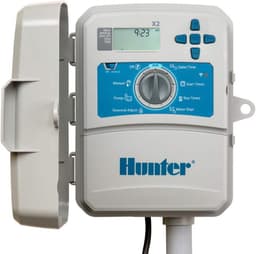
Hunter Hunter X2-800 8-station

Best value

Hunter Hunter X2-800 8-station
9.0/10about £167.00
SPW X2-800 with WAND (SPW bundle)

Alternative

SPW X2-800 with WAND (SPW bundle)
0.0/10about £312.94
On this page

Use the 2.4 GHz network

Hydrawise joins 2.4 GHz only. Hunter's specification limits that to channels 1 to 11, with WPA or WPA2 Personal, and with DHCP handing out the address. The radio does not use 5 GHz, so a phone on the faster band will show a name the controller never lists. Move the SSID onto a channel from 1 to 11 and scan again. Hunter's specification rejects enterprise certificate networks and guest networks that stop you on a browser login page. The controller expects outbound access on ports 8883, 443, 123 and 53. If a guest SSID blocks those, the name can appear and the join can still fail. Where one name hides both bands, create a separate 2.4 GHz name, then point the controller at it.

Join from the controller

Pro-HC and HPC models in this set have the radio in the cabinet. A bare X2 does not, so these steps apply only after a WAND is fitted. Open Settings, then Wireless, and choose the 2.4 GHz name. Hunter's connecting article asks for the password at the controller, at least eight characters, with capitals exactly as the router stored them. Leave the controller on DHCP. A hand-typed static address is not the path that article describes. The status line moves from Looking for Wireless to Connected. If it sits on Waiting for IP, restart the router and try the same SSID again. When the line reaches Connected, build the schedule in the Hydrawise account, on the Home plan Hunter lists at $0 a year, up to three controllers.

If the name never appears

Move closer to the router, type a hidden SSID by hand if you use one, and check the signal with a phone at the cabinet. The controller will not do better than that phone. Turn on your own phone's hotspot on 2.4 GHz, with a password of at least eight characters, and see whether the controller joins it. If the hotspot connects and the home name still never appears, the fault is the home router's band, channel, hidden name, or a filter on ports 8883, 443, 123 and 53. Call the ISP, or the person who runs the router, with that list. If your own hotspot also fails while the phone at the cabinet shows a strong 2.4 GHz signal from it, use Hunter's support path.

What the WAND changes

An X2 without a module has nothing to join. The cheaper listings say the WAND is sold separately, and the bundles that include it mention Bluetooth. Fit the module before you expect a wireless list. Once Wi-Fi is on, Hunter's X2 WAND support disables the dial and the buttons, so the schedule lives in the app. If the face never lights, and the lead is a US plug or the plate says 120 V, stop. That fault is electrical. For outdoor primary power, use a qualified electrician rather than a travel adaptor. The station-count choice is the Pro-HC vs HPC page. If there is no WAND in the box, use the which Hunter Hydrawise controller guide.

Common questions

Why is my 5 GHz network missing?
Hydrawise does not join 5 GHz. Hunter's specification is 2.4 GHz only, channels 1 to 11. A dual-band router that uses one name for both bands can hide the only frequency the controller understands. Give the cabinet its own 2.4 GHz name, on a channel in that range, and scan again.
What channel must the router use?
Use a channel from 1 to 11. Hunter's specification stops there. Channels 12 and 13, which UK Wi-Fi allows, sit outside that list, so a router left on channel 13 can be invisible to the controller while a phone still shows a strong signal. Set the 2.4 GHz network to a channel inside 1 to 11, then scan again. Security stays on WPA or WPA2 Personal.
What does Waiting for IP mean?
The controller has seen the wireless name and is waiting for an address. Hunter's connecting steps use DHCP, so the router should hand that address out without a static setup on the face. Restart the router, confirm the SSID is still the 2.4 GHz one, and watch the line move on towards Connected. If it never leaves that point on your own phone hotspot either, use Hunter's support path rather than a static address.
Does the WAND disable the dial?
Yes, while Wi-Fi is on. Hunter's X2 WAND support says the dial and the buttons are disabled in that state, and the schedule is changed in the app. Before the module is fitted, the X2 is a local dial with three programmes and four start times. The knob steps aside once the module is online. The WAND makes the join possible and takes the dial out of daily use.
When do I stop and call the ISP or an electrician?
Call the ISP, or whoever administers the router, when your own 2.4 GHz hotspot connects and the home name still never appears, or when the name appears and the join dies in a way that matches blocked outbound ports. Call an electrician when the controller will not power and the lead or the plate says 120 V, or when you are installing outdoor primary mains. Hunter assigns that outdoor feed to a licensed electrician. A US lead on a UK socket is not a settings problem.

Related pages

Sources

Public UK sources listed below, plus the amazon.co.uk prices, stars and review counts captured for these eleven listings. Last reviewed 22 October 2026.

  1. Hunter, Pro-HC metric models (retrieved 22 October 2026)
  2. Hunter, Pro-HC US models (retrieved 22 October 2026)
  3. Hunter, HPC station modules (retrieved 22 October 2026)
  4. Hunter, X2 with WAND (retrieved 22 October 2026)
  5. Hunter, Hydrawise Wi-Fi specifications (retrieved 22 October 2026)
  6. Hunter, Hydrawise Home plan (retrieved 22 October 2026)
  7. Water Supply (Water Fittings) Regulations 1999, regulation 5 (retrieved 22 October 2026)
  8. Thames Water, temporary use ban legal notice (retrieved 22 October 2026)