Independent comparisons. We may earn from shop links. More info

How to set up a smart home hub

Updated: 23 October 2026

The hub is on the table and the first sensor is still in its box. Most failures are the network name or a missing USB brick. This is how to set up a smart home hub from this comparison: power it as the listing expects, join the band the listing allows, pair one device, and only then build a routine. Which radio you should have bought is the [smart home hub buying guide](/hub/electronic-surveillance/smart-home-hub/sub/smart-home-hub-buying-guide). Shelf prices sit on the [smart home hub comparison](/hub/electronic-surveillance/smart-home-hub), from listings read on 21 October 2026.

The hub is on the table and the first sensor is still in its box. Most failures are the network name or a missing USB brick.

Our top picks

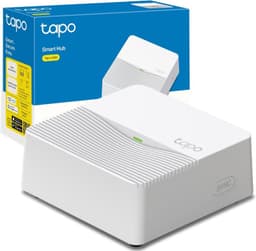
Tapo Tapo H200

Best overall

Tapo Tapo H200
7.4/10about £25.49
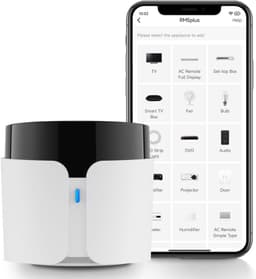
Broadlink Broadlink RM5plus

Alternative

Broadlink Broadlink RM5plus
4.2/10about £36.99
On this page

What must be in reach before you plug in

Put the power supply and the phone on the same table first. SwitchBot Hub Mini is USB-powered, and the listing and SwitchBot’s setup note both say a 5 V adaptor is not in the box. A 5 V 1 A or 2 A brick you already own is the usual fix. Broadlink RM5plus arrives as the hub plus a USB cable. Echo speakers use their own mains adaptor. Echo Hub’s stand and PoE adaptor are sold separately, so a wall install is not the unboxing step. Leave infrared hubs where they can see the appliance, because 38 kHz needs a clear view. If the route needs a hidden 13 A spur or a PoE run you cannot terminate, use an electrician. Write down the 2.4 GHz name before you open the app.

Join the network the listing allows

SwitchBot Hub Mini and Broadlink RM5plus join 2.4 GHz only. They do not fall back from 5 GHz. Hold the top button on the Hub Mini until the light flashes, then follow the SwitchBot app. If the light never settles, the phone and the hub are probably not on the same 2.4 GHz name. Tapo’s UK Wi-Fi FAQ asks you to turn off band steering, use WPA2-PSK, and pick a quieter 2.4 GHz channel. Broadlink is not compatible with mesh routers, and the SSID and password must each be under 32 characters. On a BT Smart Hub, help describes a Separate bands option. BT Smart Hub 2 cannot split the bands that way. If your router cannot split, add a simple 2.4 GHz access point.
Tapo Tapo H200

Testsieger

Tapo Tapo H200
7.4/10about £25.49

Pair one device, then a routine

Pair one device and confirm it responds before you import a house of accessories. On an Echo joining an existing home, use Amazon’s household transfer. A second account splits routines in a way that looks like a hardware fault. On Echo Hub, prove one light or plug. About Amazon UK limits the offline case to some lights, switches, and plugs, not a camera stream. On Tapo H200, add the hub in the Tapo app, then one sensor or camera from the compatible list. If Alexa should see those devices, they have to be on the H200 already. Camera limits are on the smart hub for cameras UK page. On SwitchBot, turn on the cloud connection or Alexa will not see the hub. On Broadlink, test a preset. A UserDefine button is not what Alexa fires directly.

If it still fails

Confirm the phone is on 2.4 GHz before you factory-reset, and that Broadlink names are under 32 characters and not a mesh SSID. If Echo Hub still freezes, reboot once, then use the return route. The Consumer Rights Act 2015 gives you 30 days to reject goods that are not as described. A missing SwitchBot brick is a parts gap. A hub that will not join the only network the listing allows is a description problem. On day one, change any default password, turn on two-step verification, and install the update. Echo Hub against a Show is the Echo Hub vs Echo Show 8 decision.

Common questions

How do you set up a smart home hub?
Power it with the adaptor the listing expects, join the Wi-Fi band that listing allows, and pair one device before you build routines. SwitchBot Hub Mini needs a 5 V USB brick that is not in the box, and it only joins 2.4 GHz. Prove one light, one sensor, or one preset remote command twice, then add a single routine.
Why will it not join Wi-Fi?
The usual cause in this set is a 5 GHz or mesh SSID offered to a hub that only accepts 2.4 GHz. SwitchBot states that 5 GHz is unsupported. Broadlink also refuses mesh routers and names longer than 32 characters. Tapo’s UK FAQ points to band steering and asks for WPA2-PSK. Put the phone on the same 2.4 GHz name before you assume the unit is dead.
How do you split 2.4 GHz on a UK router?
On a BT Smart Hub, BT’s help describes Separate bands, which gives 2.4 GHz its own name. BT Smart Hub 2 cannot split the bands that way. Turn band steering off, name the 2.4 GHz network something short, and use WPA2-PSK for the Tapo path. If the router cannot split, a small 2.4 GHz access point is the practical fix.
Is the USB adaptor in the SwitchBot box?
No. The listing and SwitchBot’s setup article both say the 5 V adaptor is not included. You need a 5 V 1 A or 2 A USB brick you already trust. Broadlink’s box is the hub and a USB cable, so the powered port is still yours to supply. Do not order a second hub because the first one had no brick.
What should you do on day one for passwords and updates?
Change any default password, turn on two-step verification for the account that owns the hub, and install the firmware update before you add the rest of the house. That is the National Cyber Security Centre list, and it matches the UK product-security duties. Do this on the account you will actually keep.

Related pages

Sources

Public UK sources from the digest first, then the amazon.co.uk listings compared on this page. Prices and stars are the figures already stored for this set. The digest does not date that shelf check.

  1. GOV.UK, consumer connectable product security (retrieved 22 October 2026)
  2. GOV.UK, product security laws in force (retrieved 22 October 2026)
  3. NCSC, smart devices law (retrieved 22 October 2026)
  4. Product Security and Telecommunications Infrastructure Act 2022 (retrieved 22 October 2026)
  5. ICO, home CCTV systems (retrieved 22 October 2026)
  6. CSA-IoT, Matter hub and Thread border router (retrieved 22 October 2026)
  7. About Amazon UK, Echo Hub (retrieved 22 October 2026)
  8. TP-Link UK, Tapo H200 (retrieved 22 October 2026)