Independent comparisons. We may earn from shop links. More info

HomeKit camera setup

Updated: 23 October 2026

The camera is on the table and the Home app will not take it, or the tile appeared and then went offline. HomeKit camera setup is a band problem, a hub problem, and then a maker path: Eve and Logitech stay in Home, eufy starts in its own app. This page walks those jobs for the six amazon.co.uk cameras in the [HomeKit camera comparison](/hub/electronic-surveillance/homekit-camera). It does not rank them, and it does not argue USB versus 240 V. A qualifying purchase on amazon.co.uk can earn a commission at no extra cost to you.

The camera is on the table and the Home app will not take it, or the tile appeared and then went offline.

Our top picks

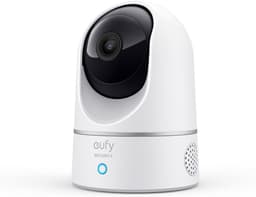
eufy Security eufy IndoorCam E220

Best overall

eufy Security eufy IndoorCam E220
7.9/10about £39.99
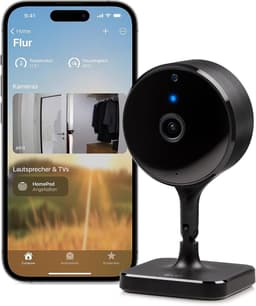
Eve Eve Cam

Alternative

Eve Eve Cam
6.2/10about £126.05
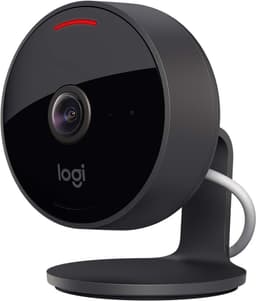
Logitech Logitech Circle View

Alternative

Logitech Logitech Circle View
5.8/10about £159.99
On this page

Add it from an iPhone, not a Mac

Apple’s support article for a smart home accessory that will not add is blunt: use an iPhone or iPad, keep Bluetooth on, and stay close to the camera. A Mac cannot add the accessory. Eve Cam’s listing also asks for an iPhone or iPad on the latest iOS or iPadOS. If you start the add on a Mac and then wonder why the code never lands, put the phone next to the camera and start again in Home. The add and the away view are different. You can often finish the tile while you are on the same Wi-Fi. Clips when you leave still need a home hub. Eve’s indoor and outdoor listings name a HomePod or Apple TV with tvOS 15, not in the box. Circle View’s specification does not name the hub; UK reviews still describe a HomePod, Apple TV, or a home-designated iPad for away view. If live view works at home and the timeline is empty once you walk to the shops, the hub is missing or not set as the home hub. That is not a broken lens. If the Home app shows an incompatible-network alert, Apple is usually pointing at 2.4 GHz. Do not factory-reset the camera yet. Put the phone on the band the camera can join, then try the add once more.

Put the phone on the band the camera can join

Eve Outdoor Cam’s FAQ says join on 2.4 GHz and keep the iPhone on that band during the add. After the camera is on the network, the phone may return to 5 GHz. Logitech’s Circle View offline article says the same: phone on 2.4 GHz, and turn 5 GHz off if the add or the live view keeps dying. Eve Cam’s FAQ allows 2.4 GHz or 5 GHz, with DHCP, no MAC filter, Bonjour and multicast on, and WPA2 rather than mixed WPA. UK reviews still fail the Eve Cam add when the iPhone sits on 5 GHz. Say that as a UK add fault, not as a claim that Eve Cam cannot use 5 GHz. The E220 table is 2.4 GHz only. If your phone is parked on a 5 GHz SSID with a similar name, the eufy add will stall in the same way. A mesh that hides the 2.4 GHz name is a common reason the QR code looks fine and Home then says the accessory cannot join. Split the bands for ten minutes, join the 2.4 GHz name, and finish the add in one sitting. Circle View has an extra rule from Logitech’s getting-started note: finish the add in one go. If you abandon it halfway, reset the camera and start again rather than leaving a half-paired tile. Eve Outdoor Cam on a ladder is the same trap; if the phone hops back to 5 GHz while you are on the last step, come down, lock the phone on 2.4 GHz, and retry.
eufy Security eufy IndoorCam E220

Testsieger

eufy Security eufy IndoorCam E220
7.9/10about £39.99

Eve and Logitech stay in Home; eufy starts in its app

Eve Cam and Eve Outdoor Cam add from a HomeKit QR code in the Home app. There is no Eve cloud account on those listings. UK buyers who already had a hub call that add straightforward. If it fails, power-cycle the camera, confirm the phone is on the right band, and scan again. Do not install a second brand app to fix Secure Video; Eve’s path is Home. Circle View is also Home-only. UK reviews describe a QR add and no Logitech app. The same file describes a QR add that looked successful and then never appeared, after which one household reset a HomePod and every device. If the tile is missing, remove any half-added accessory, reset the camera with the rear button, and add once from the iPhone that owns the home. Inviting the rest of the family comes after the owner’s phone can see live view. The E220 is the other path. The listing and eufy’s UK page tell you to add the camera in the eufy app, then activate HomeKit. eufy’s Apple Home feature guide says you authorise in the eufy app or scan a factory QR. Home view is capped at 1080p. Pan and tilt are not in Home; they stay in the eufy app. HomeBase is not compatible, so do not wait for an S380 to discover it. The E40 is an add-on on a HomeBase S380 or HomeBase 2. Add it to that hub in the eufy app first. A bullet names HomeKit; a UK review says activity zones grey out after the camera is added back to Home. Do not treat that as a Secure Video success.

When the tile goes offline

Circle View: Logitech’s offline article says hold the rear button for about nine seconds until a magenta blink and two beeps, then wait for a solid green light. Put the phone on 2.4 GHz, disable 5 GHz if you have to, and re-add. UK reviews include a unit four feet from the access point that still dropped; a nearby router is not always the fix. After the reset, finish the add in one attempt. Do not paste Circle 2 app steps; this listing is Circle View. Eve Cam: UK notes describe a unit that went offline and needed a power-cycle several times a day. Pull the USB plug, wait a minute, and put it back. If the tile stays unavailable, remove it from Home and scan the code again with the phone on the band that worked the first time. Eve Outdoor Cam has the same power-cycle habit in the wider sample, plus paired cameras that dropped at the same early-morning time until a broadband shield was reset. Check the 2.4 GHz link at the eaves before you assume the floodlight has failed. E40: if activity zones grey out after you add Home, that matches the UK review that denies full HomeKit compatibility. Pulling the camera out of Home and back in did not restore the zones in that account. Use the eufy app and the HomeBase for the timeline you actually need, and do not keep re-adding in the hope Secure Video appears. The E220 can lose events during a brand outage; one long-term user saw motion and HomeKit recording stop until eufy’s service returned. That is not a QR-code fault. If none of those recoveries bring live view back, stop before you buy a second camera. Confirm the hub is still the home hub, confirm iCloud+ is on the same Apple Account, and confirm the phone is not on a guest network. For what the plan actually stores, use HomeKit Secure Video iCloud+ UK.

Common questions

Can you add the camera from a Mac?
No. Apple’s add-fail article says use an iPhone or iPad. Eve Cam’s listing also requires an iPhone or iPad on a current iOS or iPadOS. Start the add on the phone that owns the home, with Bluetooth on, next to the camera.
Which cameras in this set join 5 GHz, and which need 2.4 GHz for the add?
Eve Outdoor Cam and Circle View want 2.4 GHz for the add, with the iPhone on that band. Eve Cam’s FAQ allows 2.4 GHz or 5 GHz; UK adds still fail when the phone is on 5 GHz. The E220 is 2.4 GHz only. After Eve Outdoor Cam joins, the phone may return to 5 GHz.
What does a HomePod or Apple TV actually unlock after the add?
Away view and the Secure Video timeline. Live view on the home Wi-Fi can work without that hub. Eve’s listings say the hub is required and not included. Circle View reviews describe the same need even though the specification block does not name it.
How do you reset Circle View when it is offline?
Hold the rear button for about nine seconds until a magenta blink and two beeps, then wait for solid green. Put the iPhone on 2.4 GHz, turn 5 GHz off if needed, and re-add. Finish that add in one go. Logitech’s indoor USB brick is assumed.
Do you add the E220 in the eufy app first?
Yes. The listing and eufy’s UK page say add it in the eufy app, then activate HomeKit. Home is 1080p. Pan and tilt stay in the eufy app. HomeBase is not compatible.
Why does Eve Cam fail when the iPhone is on 5 GHz even though Eve’s FAQ allows 5 GHz?
Eve’s FAQ allows both bands. UK reviews still fail the Home add while the phone is on 5 GHz. Move the iPhone to 2.4 GHz and try once more before you reset the camera. That is an add fault, not a claim that the camera cannot use 5 GHz later.
What happens if you abandon a Circle View add halfway?
Logitech’s getting-started note says to finish the add in one attempt. If you stop halfway, reset the camera and start again rather than leaving a half-paired tile in Home.
Why do E40 activity zones grey out after Home is added?
A UK review titled "Not compatible with Apple HomeKit" describes that exact fault after the camera is added back to Home. Do not treat the E40 as confirmed Secure Video. Use the HomeBase and the eufy app for the recording path you can actually keep.

Related pages

Sources

Public UK sources used for this comparison. amazon.co.uk shelf prices are from the listings dated 19 October 2026.

  1. Apple iCloud+ UK (retrieved 19.10.2026)
  2. Apple Support UK, Secure Video storage (retrieved 19.10.2026)
  3. ICO, home CCTV (retrieved 19.10.2026)
  4. GOV.UK, connectable product security (retrieved 19.10.2026)
  5. GOV.UK, Approved Document P (retrieved 19.10.2026)
  6. Eve Outdoor Cam FAQ (retrieved 19.10.2026)
  7. Logitech, Circle View offline (retrieved 19.10.2026)
  8. eufy UK, Indoor Cam E220 (retrieved 19.10.2026)