Independent comparisons. We may earn from shop links. More info

How to set a 24 hour plug timer

Updated: October 2026

You have a white UK dial in your hand, the pins are all down, and the lamp you plugged in an hour ago is still on. That is the usual failure, and it is a setting error more often than a dead timer. How to set a 24 hour plug timer comes down to three things: which way is on, where now sits on the dial, and whether the lamp’s own switch is on. This page uses the pin rule printed on the HBN listings in this comparison. It is not a ranking and not a wiring guide. The products are on the [Timer switch comparison](/hub/electrical-equipment/timer-switch).

You have a white UK dial in your hand, the pins are all down, and the lamp you plugged in an hour ago is still on. That is the usual failure, and it is a setting error more often than a dead timer.

Our top picks

On this page

Before you touch the pins

Plug the timer into an indoor BS 1363 socket you can reach, with one appliance only. Do not put it on an extension, do not stack a second timer into the first, and do not use a block adaptor. Check the watts on the appliance against the figure printed on the timer you actually hold. If the case is hot, cracked, or smelling, unplug it. The wired HBN immersion timer is not this procedure.

On blocks and the time now

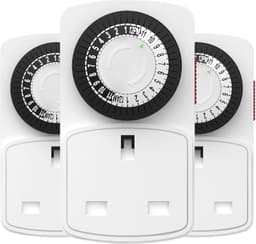
On the HBN three-pack the bullets are explicit: pins up are off, pins down are on, and new pins arrive pressed down. MDCMLKS says the same, down for on and up for off. A Status mini review states the matching method when the box does not: press the pegs down for the times you want the appliance on, then set the centre dial to the time now. Set the time before you rely on it. The HBN three-pack’s minimum is 30 minutes, so two pins are an hour on that model. If every pin is down out of the packet, the timer is not broken. Read the arrow on your unit if it disagrees with this page.

The switch on the side, and the switch on the lamp

Many of these dials have a small override. HBN plug-ins in this set state a switch knob. Defender’s bullets do not state a manual override, so do not assume the same lever exists. Permanent-on ignores the pins. Timer mode follows them. If the lamp’s switch is off, the room stays dark. Leave that switch on, and let the timer interrupt the supply. A mechanical dial has no battery claim in this set. After a power cut, turn the dial clockwise to the time again.

One test while you are there

Do not set dusk-until-midnight and leave the house. On a 15-minute dial, push down the next two or three segments from the pointer, lift the rest, set the pointer to the time now, put the side switch in timer mode, plug in a lamp that is switched on, and wait. The lamp should light on a down pin and go out on a raised pin. If it never lights, check the lamp switch, then the override. If it never goes out, you are probably still in permanent-on. If the unit never switches after a fair test, that is a faulty timer, which shows up in some Status reviews.

If it is a button timer, not a dial

NOVKIT and SURAIELEC do not set with pins. Neither menu is in a saved manual for these ASINs, so this page will not invent a button order. Set the clock to now, store one on time and one off time, and leave the unit in automatic rather than in a manual-on override. After a power cut, a mechanical dial needs the time set again. A digital listing that claims a battery is trying to keep the programme, and the lamp still cannot run while the mains is off. Tick, battery, and random mode sit on mechanical vs digital timer plug.

Common questions

Do I push the pins down for on or for off?
Down is on, up is off, on the HBN bullets and on the MDCMLKS bullets in this set. A Status mini review gives the same rule when the box has no sheet. If the printing on your dial shows the opposite arrow, follow the dial. New HBN pins arrive pressed down, so a timer that is on all day out of the packet is set that way, not broken.
Do I set the time before or after plugging in?
Set the pointer to the time now before you rely on the programme, and you can do that with the timer unplugged or plugged in. What fails is setting the pins and never turning the dial, then plugging in and leaving. After any time unplugged, set now again. These mechanical listings do not claim a battery.
Why is the lamp still on at the end of the evening?
The pins for those hours are still down, or the override is in permanent-on. Factory pins arrive down on the HBN three-pack, and the same surprise shows up on other segment timers. Lift every pin outside the on block, and move the side switch from override to timer. Then run a short block you can watch. A lamp that stays on all night is usually this, not a timer that has welded itself shut.
Does the appliance need to be switched on as well?
Yes. The timer only connects and disconnects the supply. The Argos sheet tells you to plug the appliance in and switch the appliance on. A table lamp clicked off at the neck will stay dark through a perfect programme. Leave the appliance switch on, and let the pins be the control.
The clock is wrong after a power cut. Is that this page?
For a mechanical dial, yes, and the fix is short. Turn the dial clockwise until the pointer is the time now. The pins do not need rebuilding unless you had unplugged it and knocked them. There is no battery claim on the mechanical listings here. If a digital timer lost its programme, that is a failed backup claim, not a pin error.

Related pages

Sources

Public UK sources are listed below. Shelf prices and star lines are the figures on the saved amazon.co.uk listings.

  1. Electrical Equipment (Safety) Regulations 2016, regulation 35 (retrieved October 2026)
  2. GOV.UK consumer product safety (retrieved October 2026)
  3. Electrical Safety First, plugs and fuses (retrieved October 2026)
  4. Electrical Safety First, buying electrical goods online (retrieved October 2026)
  5. Approved Document P (England, 2013 PDF) (retrieved October 2026)
  6. BSI, BS EN IEC 60730-2-7:2020 (retrieved October 2026)
  7. Timeguard NTT01 instructions (retrieved October 2026)
  8. HSE electrical equipment user checks (retrieved October 2026)