Independent comparisons. We may earn from shop links. More info

How to use a cordless drill

Updated: 2026-10-23

The screw head is torn out of the chipboard, or the tile has a crack from the corner, and the drill was already in the house. How to use a cordless drill is a sequence you set before the trigger: a seated battery, a bit that survives a tug, a collar that matches the material, and a speed the listing actually has. The ten amazon.co.uk listings sit on the [cordless drill driver comparison](/hub/drilling-and-accessories/cordless-drill-driver). Products Compared read those listings, BLACK+DECKER’s UK pages and Screwfix’s brick guide, not a lab. Which tool to own is the [cordless drill driver buying guide](/hub/drilling-and-accessories/cordless-drill-driver/sub/cordless-drill-driver-buying-guide). A qualifying purchase can earn a commission at no extra cost to you.

The screw head is torn out of the chipboard, or the tile has a crack from the corner, and the drill was already in the house.

Our top picks

On this page

Charge it and seat the bit

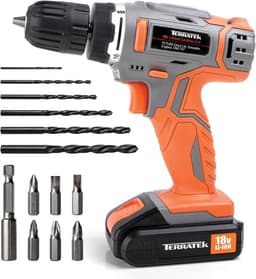
Start with the pack clicked home and the charger that belongs to that platform. A Bosch green POWER FOR ALL pack does not belong on a blue Professional tool, and a WORX 20 V pack does not charge on an 18 V Bosch charger. If the battery is swollen or damaged, do not put it on charge. Eye protection goes on before the hole. If you are drilling a wall, look for cables and pipes first. Open the keyless chuck, seat the bit fully, tighten by hand until the jaws close evenly, and tug the bit. If it pulls out, the chuck was not tight. UK reviews of the Terratek kit say the supplied bits are cheap and that the chuck held Bosch bits better than those bits in aluminium. For metal, use a sharp HSS bit. Kit bits are a start for chipboard screws. They are a poor bet for 4 mm aluminium.

The collar: screw, drill, hammer

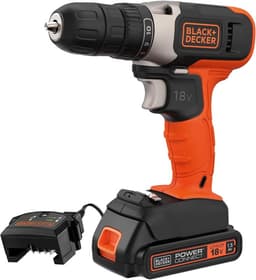
The numbered collar is a clutch. More numbers are smaller steps, not more power. The BLACK+DECKER lists ten positions, the Terratek 16 plus drill, and both EasyImpact models 20 levels. Start low on chipboard. There is no single number for every screw. Drill mode is the icon. Use it for a hole, or a numbered clutch will polish the bit. BLACK+DECKER’s UK pages put numbers with screws and drill mode with holes. Hammer stays off plasterboard, wood, metal and tile. Hammer mode is only for ordinary brick or block, on a listing that states it, with a masonry bit. The Terratek says it is not for brick. Depth is the cordless drill for brick page.

Speed, including drills with one gear

Where the drill has two mechanical speeds, low gear is for screws and larger holes. High gear is for small holes. Both EasyImpact models, both GSB 18V-65 listings, the WORX WX183.2 and the BETENST state two speeds. On those tools, screws start in low. The BLACK+DECKER BCD001 prints one speed at 600 rpm. The Terratek prints one speed at 650 rpm. You cannot add a second gear by turning a collar that is not there. The Bosch Professional bare tool does not state a speed count, so do not copy the GSB’s two speeds onto it. If the screw still cammed out, drop to a lower clutch number and keep the driver square. Leaning harder is how chipboard splits beside a cam lock.

If the tool twists

Let go of the trigger. A grabbed bit or a screw that has bottomed turns the drill, not the fastener. Release first. A side handle, where the tool has one, is the second hand on a large bit. KickBack Control is named on the two GSB 18V-65 listings, not on the Terratek, the BLACK+DECKER or the EasyImpact cards. It does not make a combi safe in a lintel. Stop if the hole is not moving, the motor smells hot, or you cannot locate a cable. HSE vibration duties apply to employers, not as a penalty for a shelf bracket. Long screws are a different mechanism on the impact driver versus drill page.

Common questions

What do the numbers on the collar mean?
They are clutch steps. The chuck slips at that step so a screw does not bury itself or tear the board. The BLACK+DECKER lists ten positions, the Terratek 16 plus drill, and both EasyImpact models 20 levels. Start low on chipboard and move up if the screw stalls. There is no single number that suits every screw in every board.
When do I use drill mode instead of a number?
Use drill mode, the icon rather than a number, when you are making a hole. A numbered clutch will click and polish the bit. BLACK+DECKER’s UK guidance puts the numbered collar with screws and drill mode with holes. Hammer, if the model has it, is a separate click and stays off for wood, metal, plasterboard and tile.
When is hammer mode allowed?
Only on a listing that states hammer mode, and only for ordinary brick or block with a masonry bit. Keep it off for tile, plasterboard, wood and metal. The Terratek listing says it is not for brick, so do not hunt for a hammer icon. The EasyImpact 18V-38 review that mentions bathroom tiles used the drilling function.
How do I tighten a keyless chuck?
Seat the bit fully, close the jaws by hand until they meet the shank evenly, and tug the bit. If it pulls out, tighten again. A loose chuck makes every clutch setting feel faulty. On the Terratek, UK reviews preferred better bits than the kit for aluminium, so a tug test on a worn kit bit is not the same as a sharp HSS bit held properly.
What if my drill only lists one speed?
Use that speed. The BLACK+DECKER lists 600 rpm and the Terratek lists 650 rpm. There is no second gear to select.
What do I do if the drill twists?
Release the trigger at once. A grabbed bit or a screw that has bottomed will rotate the tool. Reset your stance, use a side handle if the drill has one, and check that the collar is in drill mode for a hole. On the GSB 18V-65, KickBack Control is a listed switch. If the bit is blunt or the material is a lintel, stop rather than forcing the hole.

Related pages

Sources

Public UK sources from the research digest. Shelf prices and star lines are the amazon.co.uk figures in the display file.

  1. Toolstation drill buying guide (retrieved 22 October 2026)
  2. Homebuilding: types of drill (retrieved 22 October 2026)
  3. UK Tool Store: how to choose a cordless drill (retrieved 22 October 2026)
  4. Gtech: how to choose a cordless drill (retrieved 22 October 2026)
  5. GOV.UK: Supply of Machinery (Safety) Regulations 2008 (retrieved 22 October 2026)
  6. BSI: BS EN 62841-2-1:2018+A12:2022 (retrieved 22 October 2026)
  7. HSE: Control of Vibration at Work Regulations 2005 (retrieved 22 October 2026)
  8. HSE: indicative vibration magnitudes (retrieved 22 October 2026)