Independent comparisons. We may earn from shop links. More info

How to set up Zosi CCTV so the first night is stored

Updated: 16 October 2026

You have the box open, the screen is on, and the timeline is empty. On a Zosi parcel from amazon.co.uk that usually means power, a picture still stuck in analogue, or a disk that was never formatted. This is how to set up Zosi CCTV until a short clip stays. The Products Compared editorial team used Zosi's install notes and the twelve listings checked on 15 October 2026. There is no laboratory test. The table is the [Zosi security camera comparison](/hub/burglar-protection/zosi-security-camera). If you buy through our links, we may earn a commission at no extra cost to you.

You have the box open, the screen is on, and the timeline is empty. On a Zosi parcel from amazon.co.uk that usually means power, a picture still stuck in analogue, or a disk that was never formatted.

Our top picks

On this page

Which box you opened

A DVR kit, an add-on camera, and a Wi-Fi camera do not share a menu. A kit is a recorder plus cameras on BNC leads. An add-on still needs the recorder you own, a 12 V supply, and a video lead. The C289 does not use that recorder. An empty bay can show a live picture and still keep nothing overnight. On a kit, use HDMI or VGA and seat each BNC before you blame the disk. On the C289 the picture is in Zosi Smart, after the camera has 12 V. If the screen stays black, reseat the plug and the video lead before you open a format menu. Missing parts are on the Zosi CCTV buying guide.

Fit and format the drive

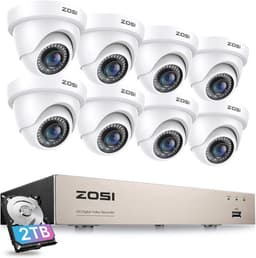
A new Zosi DVR keeps files only after an internal disk is screwed in and formatted. Unplug first, fit the SATA leads already in the case, screw the drive down, and format it from Hard Disk Management. Fit one drive at a time and leave it on Read and Write. A format deletes what is on that disk. The £79.99 kit includes no hard drive. The eight-camera kit names a 2 TB drive, and you still format it. Record a minute, disconnect the camera, and look for that minute. An empty timeline means the disk is missing, unformatted, or barred from writing.

Leave 960H only if the card says so

A coarse picture on a hybrid camera is often analogue 960H, not a dead sensor. The £17.99 bullet ships in 960H. Hold the OSD button for about five seconds. A sharper mode appears only if the recorder accepts it. On the dome card, right selects TVI and up is the CVBS default. On the gun card, up selects TVI and right is the CVBS default. Follow the card in the box. A 960H-only recorder will not grow a 1080p input because you moved the stick. If the card matches neither map, the card wins.

Zosi Smart and the Wi-Fi camera

The app shows a picture that already exists somewhere else. A DVR writes to its disk with the broadband off. Zosi's FAQ says local recording does not need the internet, and the app does. If Zosi Smart crashes, the hallway clip on the disk is still the test. The C289 is 2.4 GHz only. A mesh node that offers only 5 GHz will refuse the join. Leave the camera near the router on its 12 V adapter for the first connection. The memory card is not in the box, so a clip for tomorrow needs one you add. Alexa is named on the listing, and reviews do not confirm the skill finds the camera. The cable choice is on Zosi wired vs Wi-Fi.

When it is a fault, not a setting

A recorder that never powers, a black picture on a known-good channel, or a failure in every mode is a dead unit. Section 22 of the Consumer Rights Act 2015 gives you 30 days to reject faulty goods. If a plug scorches or trips the breaker, unplug it and stop. Working means a live picture and a short clip that remains after you disconnect the camera.

Common questions

Why is there no recording on a new DVR?
The recorder can show a live picture and still have nowhere to put a file. Unplug, fit one internal SATA drive, screw it down, and format it in Hard Disk Management. The £79.99 kit does not include that drive. Leave the disk on Read and Write.
How do I format without wiping a disk I meant to keep?
You do not. Zosi's UK disk page says a format deletes what is on that disk. If the disk still holds files you want, remove it and fit a different surveillance drive. Format only the disk that may become the recorder's store, one drive at a time.
Which way do I hold the OSD joystick?
There is no single direction. The dome card uses right for TVI and up as the CVBS default. The gun card uses up for TVI and right as the CVBS default. On the £17.99 bullet, hold the control for about five seconds, then follow the card in that box. If the card disagrees with both maps, the card wins.
The Wi-Fi camera will not join. Is it 5 GHz?
On the C289, that is a likely cause. Zosi's UK page for that camera states 2.4 GHz only. A router or mesh node offering 5 GHz alone will not complete the join. Put the camera close to the router for the first attempt, on its 12 V adapter. You still need a memory card if you want a file after live view ends.
When should I talk to the seller instead of Zosi?
Stop when the unit is dead rather than mis-set: no power, a black picture on a known-good channel, or a failure in every mode. You have 30 days to reject faulty goods under section 22 of the Consumer Rights Act 2015, with the amazon.co.uk seller. A scorched or tripping plug is an electrician. A Zosi chat does not reset that clock.

Related pages

Sources

Public UK sources, Zosi’s UK and help pages, and the amazon.co.uk listings in this comparison. Last checked 15 October 2026.

  1. ICO: home CCTV systems (retrieved 15 October 2026)
  2. GOV.UK: domestic CCTV on your property (retrieved 15 October 2026)
  3. Surveillance Camera Commissioner: about (retrieved 15 October 2026)
  4. Consumer Rights Act 2015 (retrieved 15 October 2026)
  5. Zosi: hard drives for DVRs and NVRs (retrieved 15 October 2026)
  6. Zosi UK: C289 3MP pan-tilt Wi-Fi camera (retrieved 15 October 2026)
  7. Zosi: cloud storage FAQ (retrieved 15 October 2026)
  8. Zosi UK: DVR or NVR without internet (retrieved 15 October 2026)