Independent comparisons. We may earn from shop links. More info

How to install a dome camera

Updated: 22 October 2026

The usual failure is not the drill bit. You fix the dome, then the picture is blank, wide and soft, or white at night. This is how to install a dome camera after you have already chosen one, whether that is a 12 V add-on or a Tapo or eufy that uses an app. Prove a picture on the bench, switch the video mode, then drill, then look again in the dark. The models and the missing leads are on the [dome camera comparison](/hub/electronic-surveillance/dome-camera). This page is from Peter F., editor for DIY & tools. This is not a wiring certificate.

The usual failure is not the drill bit. You fix the dome, then the picture is blank, wide and soft, or white at night.

Our top picks

Tapo Tapo C211

Best overall

Tapo Tapo C211
9.4/10about £21.99
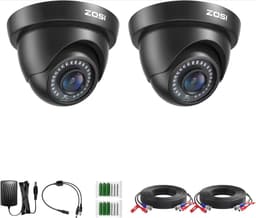
ZOSI ZOSI 2-camera pack

Alternative

ZOSI ZOSI 2-camera pack
8.8/10about £39.99
Loocam Loocam 2MP dome

Alternative

Loocam Loocam 2MP dome
8.2/10about £22.99
On this page

Test it before you drill

A wired dome and a Wi-Fi dome do not share a first step. For a DVR add-on, put the camera beside the recorder before any cable goes through a wall. You need 12 V and a BNC. Loocam omits the power supply and the video cable. The SANNCE highlight says no adapter. Only the ZOSI pair includes those leads. A black channel is a missing lead or the wrong video mode. If you are still choosing, use the wired or Wi-Fi page first. A Wi-Fi camera is benched in the maker's app. Use the Tapo app for a C210, C211, or C530WS. The microSD is not in the box. One eufy setup never identified the C220. The C211 adapter is a mains plug.

Match the recorder, or there is no 1080p

A soft, wide picture on a 1080p dome is often the mode it shipped in. Loocam says the default is 960H until you change TVI, CVI, AHD, or CVBS in the on-screen menu. JUSTOP says analogue mode will not output 1080p. DCSEC stays on analogue, about 1200 TVL, until you use the joystick cable. One SANNCE buyer never saw more than what looked like 360–480p. Leave the mode alone and you will judge a 1080p title by a 960H picture. ZOSI publishes a five-second joystick hold to leave CVBS on one of its own 4-in-1 domes. Use that only as proof that a switch exists. Do not copy it onto JUSTOP, Loocam, or DCSEC. The ZOSI pack in this set is not compatible with a 960H DVR. The Hikvision spec field says wireless, while four UK reviews describe a cable, a 12 V transformer, and no model number. Do not invent a connector. If you cannot name the format, stop.
Tapo Tapo C211

Testsieger

Tapo Tapo C211
9.4/10about £21.99

Mount, seal, and aim

Once the bench picture is the mode you wanted, mark the base, pass the cable, then fix the plate while the recorder is still showing the view. ZOSI reviews are the caution. The cover plate was hard to remove, the angle was awkward to change, and the supplied cable joints would not fit in the rear housing on a solid wall. If the joint will not hide, leave a small loop outside rather than crushing the BNC. A 3.6 mm lens is not a view of the whole street. The DCSEC 1.7 mm lens is sold as 180°, and one buyer thought it was nearer 120°. If the frame still takes the pavement, the outdoor page has the ICO rule. Peel the clear film once the screws are in. A film, dirt, or a soffit close to the bubble will bounce infrared back at night.

Night test and the stop points

Look after dark before you seal the job. A white frame is usually infrared bounce, a film still on the cover, or a camera that cannot do the night claim. DCSEC reviews describe night vision that washed out, even though the listing says 30 ft. The C530WS pan froze for one buyer on an extension lead. Use its own adapter, about 3 m. Stop for a new 230 V circuit. In England that work is notifiable under Approved Document P. A plug-in supply is the ordinary DIY case. Also stop for a bathroom zone, a listed building, or a stair you do not control.

Common questions

What do I connect first on a wired dome?
Power and video, on the bench, into a recorder that is already on. You should see a picture, even if it is the soft default mode. Only then run cable and drill. If there is no 12 V adapter, which is the SANNCE highlight and the Loocam listing, buy the supply before the rawlplugs.
Why is the picture wide and soft after install?
The camera is probably still in analogue or 960H. Loocam, JUSTOP, and DCSEC all say the HD picture is a mode you select. Change it from that camera's sheet, not from another brand's diagram. A 1.7 mm DCSEC will still look wide after the switch. That part is the lens.
Where do the power supply and the coax come from?
From a separate purchase, on most single cameras here. The ZOSI pair includes a power supply and a video cable. Loocam states that both are extra, and so is the DVR. SANSCO includes a short pigtail and sells the extension BNC separately. Wi-Fi cameras include a mains adapter and leave out the memory card.
Why is the night picture white?
Infrared is bouncing off the bubble, the protective film, dirt, rain, or a soffit close to the lens. Peel the film after the screws are in and check the foam ring if the camera has one. If a DCSEC is white with a clean cover, reviews in this file say the fault can be the camera. Return it while it is still on the bench.
When do I stop and call an electrician?
When you need a new mains circuit, not a plug-in adapter. In England that circuit is notifiable. Also stop for a bathroom zone, ladder work beyond you, a listed building, or a DVR format you still cannot name. A shop or a shared stair you do not control is the same stop.

Related pages

Sources

Public UK sources from the research digest, used for this page in October 2026. Prices, stars and review counts are from the 12 amazon.co.uk listings captured on 19 October 2026. IP ratings and infrared distances are listing claims. This is not a laboratory test, and a listed infrared distance is not a face-identification distance.

  1. ICO, Home CCTV systems (retrieved 19 October 2026)
  2. GOV.UK, Domestic CCTV (retrieved 19 October 2026)
  3. GOV.UK, recommended standards for the surveillance camera industry (retrieved 19 October 2026)
  4. Planning Portal, CCTV (retrieved 19 October 2026)
  5. Approved Document P (2013) (retrieved 19 October 2026)
  6. Consumer Rights Act 2015, section 22 (retrieved 19 October 2026)
  7. HCWS386, 24 November 2022 (retrieved 19 October 2026)
  8. IEC, IP ratings (retrieved 19 October 2026)