Independent comparisons. We may earn from shop links. More info

How to install an Arlo doorbell

Updated: 22 October 2026

You already have a 2nd-generation Arlo doorbell, AVD3001 or AVD4001, and you are fitting it on the battery rather than on the old bell wires. The job falls into two phases: the phone has to see the doorbell on 2.4 GHz Wi-Fi, and only then does the plate go on the wall at the height Arlo states. This is how to install an Arlo doorbell on that battery path. The [Arlo doorbell comparison](/hub/electronic-surveillance/arlo-doorbell) is where the five listings and their prices sit. If the app later asks you to choose wired power, stop and open the wired page. This page is from Peter F., editor for DIY & tools.

You already have a 2nd-generation Arlo doorbell, AVD3001 or AVD4001, and you are fitting it on the battery rather than on the old bell wires.

Our top picks

On this page

What you need before the first screw

Charge until the LED is solid blue before the doorbell goes near the wall. Arlo’s chime-bundle quick start uses that solid blue LED as the full-battery signal, and the release pin opens the charge port. The four specified amazon.co.uk boxes in this set include the plate, the angled bracket, the release pin, and the screws. B0CZPGFP5L says a chime in the title and does not itemise that kit, so do not assume the pin and the bracket are there until you open it. A drill is only for masonry where the screws will not bite. Sign in and install the firmware prompt when it appears. Leave mobile data off if a chime refuses to join. That step comes from a UK review of the chime bundle. The doorbell’s own join is still 2.4 GHz Wi-Fi.

Pair the doorbell, then choose battery

Press the setup control until the LED flashes blue, then add the device in the app and stay with it until the doorbell is on the 2.4 GHz network. When the app asks how the doorbell is powered, choose battery. If you meant to use the existing bell wires, do not guess the voltage on this page. Leave the wires alone and read Arlo doorbell wired or battery. Choosing “wired” in the app does not remove the battery. Finish the live view once, while the doorbell is still in your hand, before you commit to holes. Cloud clips and person labels are not part of this test. If you want that split before you subscribe by accident, use the Arlo doorbell subscription page after the picture is up. Bluetooth on the phone is what the wireless article expects for the first join. If the browser path stalls, go back to the phone.
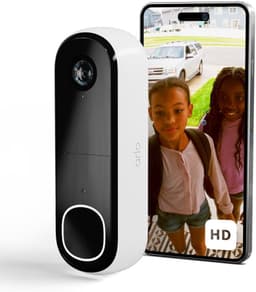
Arlo Arlo HD doorbell, white

Testsieger

Arlo Arlo HD doorbell, white
8.0/10about £49.00

Mount at 122 cm and check the live view

Arlo states 48 inches, which is 122 cm, from the ground to the doorbell. Hold the plate, open live view, and look. Leave about 5 cm of clearance above the plate so the doorbell can slide down onto it. Use the angled bracket when a flat plate would point the lens into a side wall or off your own step. Mark, screw, and seat the doorbell with a down-and-in click. If it does not click, the release pin is the way back off, not a pry with a screwdriver against the face. Check live view again after the click.

When this is no longer a DIY fit

Call an electrician if you cannot prove the transformer voltage, if the cable looks damaged, or if you might be holding mains. Choosing battery power is the path that avoids that. Stop, too, if the door is leased or communal and the freeholder has not agreed to holes in the frame. A battery doorbell still needs screws for the plate Arlo describes. A sticky mount is not in the included kit of the four specified listings. The install does not change between AVD3001 and AVD4001: charge, pair on 2.4 GHz, choose battery, mount at 122 cm, click. What changes is whether a UK chime was in the parcel.

Common questions

Do you charge it before it goes on the wall?
Yes. Charge until the LED is solid blue, which is the full-battery signal in Arlo’s chime-bundle quick start. The release pin opens that charge port and later releases the doorbell from the plate. Fitting a flat battery means you cannot tell a failed pair from a dead cell.
Why will it not see the Wi-Fi network?
The doorbell uses 2.4 GHz. If your phone is on 5 GHz only, the app is looking at the wrong band. Put the phone on the 2.4 GHz name, then pair again. Range at the door matters as well. Arlo’s UK steps do not offer a 5 GHz mode for this 2nd-generation doorbell.
How high is 48 inches in centimetres?
48 inches is 122 cm. Arlo’s wireless install article prints 48 inches for the 2nd-generation doorbell. Measure from the ground to the doorbell, leave about 5 cm clear above the plate, and check the live view before you commit the screws. A lower plate fills the picture with the step. A higher plate crops faces.
What is the release pin for?
It separates the doorbell from the mounting plate, and on the chime-bundle quick start it also opens the charge port. You use it to charge, to seat the unit, and to take the unit off later without levering the face. It is in the components line of the four specified ASINs.
When do you use the angled bracket?
Use it when a square plate would point the 180° view into a side wall, a neighbour’s window, or the street. Hold it, open live view, and look before you drill the final holes. If the flat plate already shows your own step and little else, you do not need the bracket.
Does the indoor chime use the same steps if it was not in your box?
No. Pair and mount the doorbell first. The Chime V2 steps apply only when the components line included it, which in this set is the UK-plug line on B0CRVJ79LB. The other specified listings do not list a chime. Phone calls and motion alerts do not need that plug-in sounder.
At what point should an electrician take over?
As soon as you intend to use the existing bell wires and you cannot show that the transformer is 8–24 V AC at 10 VA or more, or the cable looks damaged, or you might be on 230 V mains. Battery mounting with the included screws stays a householder job if you are allowed to drill.

Related pages

Sources

Public UK sources and the amazon.co.uk listings in this set, last checked on 19 October 2026.

  1. Arlo UK doorbells (retrieved 19 October 2026)
  2. Arlo UK: differences between video doorbells (retrieved 19 October 2026)
  3. Arlo UK: install a 2nd-generation doorbell without hardwiring (retrieved 19 October 2026)
  4. Arlo: measure doorbell transformer voltage (retrieved 19 October 2026)
  5. Arlo UK: subscription plans and cloud recording (retrieved 19 October 2026)
  6. ICO: home CCTV systems (retrieved 19 October 2026)
  7. GOV.UK: domestic CCTV (retrieved 19 October 2026)
  8. GOV.UK: consumer connectable product security (retrieved 19 October 2026)
  9. Expert Reviews: Arlo plan prices in a UK camera review (retrieved 19 October 2026)
  10. amazon.co.uk listings B0CRVJ79LB, B0CRVPBRC8, B0CRVN1RTX, B0H41CWMC5, B0CZPGFP5L (retrieved 19 October 2026)