Independent comparisons. We may earn from shop links. More info

Klarstein heater app and Wi-Fi setup

Updated: 22 October 2026

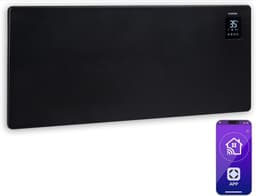
You unpacked the heater, installed the Klarstein or Klarstein Experience app, and the pairing spinner never finishes, or it paired once and the schedule stopped after an update. Klarstein heater app Wi-Fi problems show up on both Bansin convectors and the picture panels in the amazon.co.uk capture, often tied to 2.4 GHz networks, router menus and firmware. The [Klarstein heater comparison](/hub/heating/klarstein-heater) lists the app as a feature. This page is the procedure, the checks that matter in a UK home, and when to fall back to the controls on the heater. Peter F. checked the listings and public UK sources. There was no lab test. A qualifying purchase can earn a commission at no extra cost to you.

You unpacked the heater, installed the Klarstein or Klarstein Experience app, and the pairing spinner never finishes, or it paired once and the schedule stopped after an update.

Our top picks

On this page

Before you open the app

Confirm the heater runs from its own controls first. On the white 1500 W Bansin, use the touch panel. On the panels, use the manual switch. If the element never heats locally, Wi-Fi will not fix it. Two listings warn that English is not guaranteed. Bansin bullets name Klarstein Experience. Picture panels name a mobile app. Put the phone on the 2.4 GHz network you intend for the heater. Many of these devices refuse a 5 GHz-only setup. If the hub hides both bands under one name, split them, or use a 2.4 GHz guest network that does not isolate clients.

A pairing flow that matches owner reports

Start within a few metres. Enable Bluetooth and location if the app asks. Some builds use Bluetooth first, then pass the Wi-Fi password. Power-cycle once: off at the wall, ten seconds, on, then enter the 2.4 GHz password. Saved reviews on the 2500 W Bansin describe failure on a Telekom Speedport after the stated steps. If pairing fails twice, a 2.4 GHz phone hotspot is a diagnostic only. Login failures on the 1500 W unit have no detailed fix in the saved texts. Sign out and reinstall. Some buyers then ran the heat from the panel. A panel showing 37 °C while the air stays cool is a product limit, not a pairing fault.

Schedules, timers and what to trust

Bansin bullets advertise weekly timers. Picture-panel comments lean on the app. Heat for thirty minutes starting five minutes from now, and confirm the unit starts and stops without you reopening the app. The 1500 W capture says the timer counts hours rather than a clock time. Open-window detection is asked and not confirmed. Picture-panel reviews describe an update that removed control until a later fix. App Store reviews in Great Britain mention schedule drift, so check the room rather than the notification. Delay an update before a cold snap if manual mode already works.

When the app works and the room stays cool

Pairing success does not guarantee even heat. On the 700 W panel, reviews describe cut-out at 37 °C while room air stays near 20–21 °C, including in an 8 m² bathroom. That is the control limit, not a Wi-Fi dropout. A convector listing 5–50 °C is the closer match if air temperature matters more than a picture. A bright lamp on the 700 W manual switch is hardware, not an app setting. Relay clicks on the 1500 W Bansin are unrelated to Wi-Fi. Voice control appears in one non-UK review of the 2500 W unit. The bullets do not name Alexa or Google, so treat it as unconfirmed unless that app screen shows it.

If pairing never finishes

If the app never pairs, run the heater on its own thermostat. Use a plug-in timer only if the instructions allow one on this load. Do not bypass a safety cut-out, and do not switch on a case that rattles. One 2500 W review described loose internal parts, and that unit was not powered on. Keep screenshots, the app version, the router and the network band. Seller replies in the reviews are described as slow. An amazon.co.uk return may be faster for a unit that will not heat, inside the return window. What to check before you depend on smart heat is in the Klarstein heater buying guide. Which listing still heats from its own panel is on best Klarstein heater.

Common questions

Does a Klarstein heater need 2.4 GHz Wi-Fi?
Owner reports, and UK threads on similar wall heaters, point to 2.4 GHz for the first connection. A hub that hides both bands under one name often needs a separate 2.4 GHz network that does not isolate clients. A 5 GHz-only home is a common reason the spinner never finishes. The phone can use 5 GHz afterwards. The setup step itself usually needs 2.4 GHz.
Can I control the heater without Wi-Fi?
The Bansin listings keep a thermostat and a timer on the unit, so you can heat if the app never joins the router. Picture panels still have a manual switch. Buyer comments describe their schedules as an app job, so a week plan may not exist on the heater itself. Confirm local heat before you spend an evening on the router.
Why does login fail when Bluetooth sees the device?
The phone can see the heater over Bluetooth and still fail at the account. That split points to the login, the region or the server, not to the element. Sign out, reinstall, and check the Great Britain store version. A 1500 W review describes a login failure without a detailed fix, and that buyer used the panel on the heater.
Will a schedule run if my phone leaves the house?
A cloud schedule should run on the heater’s own connection after you save it. Reviews still question whether it fires. Test one cycle while you are in the room, then one while you are out, and check the room when you return. A notification on the phone is not proof the element switched.
When is the app not the problem?
No heat from the heater’s own controls, a burnt smell, or damage in transit needs a return, not another router setting. A case that rattles should stay unplugged. A breaker that trips when the heater starts needs an electrician. The Consumer Rights Act 2015 applies when the unit does not match the description.

Related pages

Sources

Prices, stars and review counts are from amazon.co.uk listing files captured on 20 October 2026. Public UK sources are listed below. Page updated October 2026.

  1. amazon.co.uk listings B08GX4NN5W, B08QNBGWH8, B08QNC4PZF and B08GWTMLWC (retrieved 20 October 2026)
  2. Ofgem price cap, 1 October to 31 December 2026 (retrieved 20 October 2026)
  3. GOV.UK, placing energy-related products on the UK market (retrieved 20 October 2026)
  4. Assimilated regulation 2015/1188, Annex II (retrieved 20 October 2026)
  5. Electrical Equipment (Safety) Regulations 2016, regulation 35 (retrieved 20 October 2026)
  6. Electrical Safety First, How safe is your home? 2025 (retrieved 20 October 2026)
  7. Electrical Safety First, BS 7671 section 701 (retrieved 20 October 2026)
  8. Consumer Rights Act 2015, section 11 (retrieved 20 October 2026)