Independent comparisons. We may earn from shop links. More info

How to use a wireless meat thermometer

Updated: October 2026

Learning how to use a wireless meat thermometer starts before the probe goes into the food. Charge the equipment, remove any shipping film, put every internal sensor in the thickest part, and leave the booster close to the cooker but outside the heat. Most first-cook failures are mundane: a plastic tab blocks charging, the tip alone sits in the meat, or a metal lid separates the probe from a base left indoors. This sequence covers the cable-free and receiver-style products in our [wireless grill thermometer comparison](/hub/grill-accessories/wireless-grill-thermometer). The manual for your model still controls charging, heat limits and cleaning. A qualifying purchase from our links can earn us a commission at no extra cost to you.

Learning how to use a wireless meat thermometer starts before the probe goes into the food.

Our top picks

TempPro TempPro TP20

Best overall

TempPro TempPro TP20
7.7/10about £40.49
ThermoMaven ThermoMaven G1

Rank 2

ThermoMaven ThermoMaven G1
8.4/10about £69.99
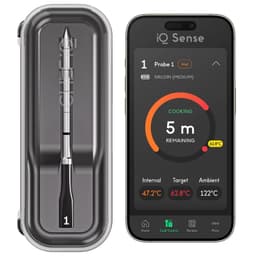
CHEF iQ CHEF iQ Sense

Alternative

CHEF iQ CHEF iQ Sense
6.6/10about £59.49
On this page

Charge it and take the film off

Follow your model’s power instructions rather than borrowing another brand’s charge time. Cable-free probes may charge in a case. The TP20 uses four AAA batteries. The TempSpike booster is battery-powered. Remove every shipping tab or film named in the instructions. UK CHEF iQ reviews in this comparison include pairing that failed until a plastic tab came off the hub. If a new probe is invisible to the app, reseat it, dry the contacts, and follow the reset once. Do not keep heating a probe that has never shown a stable room-temperature reading. Install the app and its permissions before you handle raw food. On a receiver, switch on both units and confirm that each channel responds.

Put the sensors in the meat

Insert the probe into the thickest edible part, avoiding bone, fat pockets and the grate. On chicken, use the thick area around the breast-thigh junction without touching bone. Push the probe past its safety line so the internal sensors are covered, and leave the ambient end outside the meat. One LYMIN review says the probe did not read when only the tip was inserted. INKBIRD lists a 10.2 cm probe, and CharMeter includes a short probe beside a long one. If the food cannot cover the sensing area, use an instant-read thermometer. Set the target from the UK rule, not a USDA menu. The safe BBQ meat temperature guide sets out the combinations.
TempPro TempPro TP20

Testsieger

TempPro TempPro TP20
7.7/10about £40.49

Leave the booster by the cooker

Put the booster, charging case or transmitter as close to the closed cooker as the instructions allow, away from direct heat, rain and grease. A metal lid can weaken the signal. Wi-Fi does not remove that first hop: the probe still has to reach the base. Carrying the booster indoors can drop the link even when broadband is fine. Meatmeet says to keep the S Pro within 3 m of its booster and the X Pro under 5 m when the cooker is enclosed. Close the lid and confirm a stable reading. If the link drops, move the base closer and keep it out of the heat. The phone side of that link is in the Wi-Fi versus Bluetooth guide. When the alarm sounds, follow the official hold time.

Clean it before it touches cooked food

Treat a probe that has entered raw meat as contaminated. The Food Standards Agency says to clean a food thermometer after use. Wash the sensing section as the manual describes, dry the contacts, and wash your hands before the cooked joint. Do not move a raw-meat probe straight into ready-to-eat food. An IPX8 probe may be dishwasher safe. Waterproof with no IP code is less clear. The TP20 body must not be immersed, and a splash-resistant base is not dishwasher safe. Stop if the case becomes hot, the casing splits, a probe snaps, or a loose coin cell is within a child’s reach. Do not serve the food if a fragment is missing. Probe length and booster style are in the wireless meat thermometer buying guide.

Common questions

Where should I put the probe in a chicken?
Place it in the thickest fleshy area around the breast-thigh junction, without touching bone. The internal sensing section must be fully inserted to the probe’s mark, and any ambient end stays outside the meat. Check more than one thick area if the bird cooks unevenly.
How far must a wireless probe go in?
Insert it beyond the manufacturer’s safety line or minimum-depth mark so the internal sensors are covered. The tip alone may not be the only sensing point. If the food is too thin to reach that line without touching the grate, use a shorter probe or another thermometer.
Where should the charging base sit?
Keep it near the cooker, outside direct heat, and protected to its stated water resistance. A closed lid can weaken the probe-to-base signal, so taking the base indoors may cause drop-outs. Do not put a plastic charger or receiver on a hot barbecue shelf unless the instructions explicitly allow that place.
What if the app cannot find a new probe?
Check the charge, remove shipping tabs or film, clean and dry the contacts, and pair beside the base. Confirm that Bluetooth and the required permissions are on, then follow the model’s reset once. If it still cannot produce a stable reading, contact support instead of heating it again.
Can the probe go in the dishwasher?
Only if that exact listing and the manual say so. Some IPX8 or IP69 probes are described as dishwasher safe. That does not include the charging base. Products with no published IP code need extra caution. A receiver body such as the TP20 should be wiped, not immersed.
When should I stop using the thermometer?
Stop if the probe is cracked, badly bent, snapped, overheating in the charger, or giving implausible readings after correct placement and a reset. Do not cook on the assumption that a frozen app value is current. If a piece breaks off in the food, account for every fragment before you serve.

Related pages

Sources

Public UK sources and amazon.co.uk listings used for this comparison. Prices were taken from those listings and can change. Retrieved October 2026.

  1. Food Standards Agency — Cooking your food (retrieved October 2026)
  2. Food Standards Agency — BBQ food safety (retrieved October 2026)
  3. Food Standards Agency — Burgers (retrieved October 2026)
  4. MEATER UK — MEATER Pro (retrieved October 2026)
  5. Smoke and Lump — UK wireless thermometer buying guide (retrieved October 2026)
  6. BBC Science Focus — smart meat thermometers (retrieved October 2026)
  7. GOV.UK — General Product Safety Regulations 2005, Great Britain (retrieved October 2026)