How to programme a Gardena water control
You have a Gardena Water Control Select on the outside tap, or you want the button order before you pay £53.99 for one. How to programme a Gardena water control on this model starts with the clock, not with the watering days. If the weekday is wrong, the three schedules run on the wrong morning. This page is from the Products Compared editorial team, updated on 21 October 2026. The sequence follows the Select 1891 operator's manual and the UK product page, not a bench test of our own. A qualifying purchase through our links can earn a commission at no extra cost to you. Model choice sits on the [Gardena water timer comparison](/hub/garden-watering/gardena-water-timer).
You have a Gardena Water Control Select on the outside tap, or you want the button order before you pay £53.99 for one.
You have a Gardena Water Control Select on the outside tap, or you want the button order before you pay £53.99 for one. How to programme a Gardena water control on this model starts with the clock, not with the watering days. If the weekday is wrong, the three schedules run on the wrong morning. This page is from the Products Compared editorial team, updated on 21 October 2026. The sequence follows the Select 1891 operator's manual and the UK product page, not a bench test of our own. A qualifying purchase through our links can earn a commission at no extra cost to you. Model choice sits on the Gardena water timer comparison.
Our top picks
| Badge | Product | Control | Schedules | Power | Note | Price | Offer |
|---|---|---|---|---|---|---|---|
| Best overall |  Gardena Gardena Water Control Easy (01896-20) | One radial knob | 15 presets | Not in the table; a review says batteries are extra | 9.6 | about £28.82 | View offer |
 Gardena Gardena Water Control Select (1891-28) | Twist and press | 3, with weekdays | – | 9.4 | about £53.99 | View offer | |
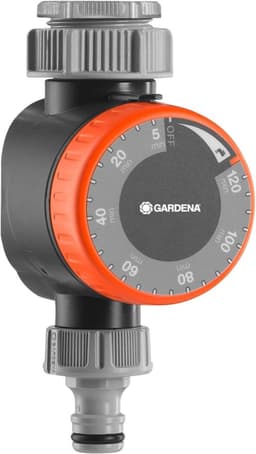
| Alternative |  Gardena Gardena Water Timer (1169-20) | Rotary wheel | One run, 5–120 minutes | Reviews describe clockwork and no battery | 9.0 | about £31.99 | View offer |


On this page
Fit it before you programme it
Clock first, then the three schedules
Water Now, lock and the soil sensor
These steps do not fit every Gardena
Common questions
What order do I set on the Select?
How do I run water now without deleting the programme?
Why did it water on the wrong day?
Which battery, and is it included?
Which way up does it go on the tap?
Can I follow these steps on Easy or EasyPlus?
Related pages
Sources
Manufacturer pages, the Select manual, and UK public sources for bans and backflow. Listing prices, stars and review counts are the amazon.co.uk lines saved on 19 October 2026. This is not a lab test.
- Gardena UK Select 1891-28 (retrieved 19.10.2026)
- Gardena UK Easy Plus 1897-28 (retrieved 19.10.2026)
- Gardena UK Flex (retrieved 19.10.2026)
- Gardena UK smart Water Control 19033-20 (retrieved 19.10.2026)
- Gardena Select manual (retrieved 19.10.2026)
- Thames Water temporary hosepipe ban legal notice (retrieved 19.10.2026)
- WaterSafe — double check valve on an outside tap (retrieved 19.10.2026)
- Water Industry Act 1991 s.76 (retrieved 19.10.2026)